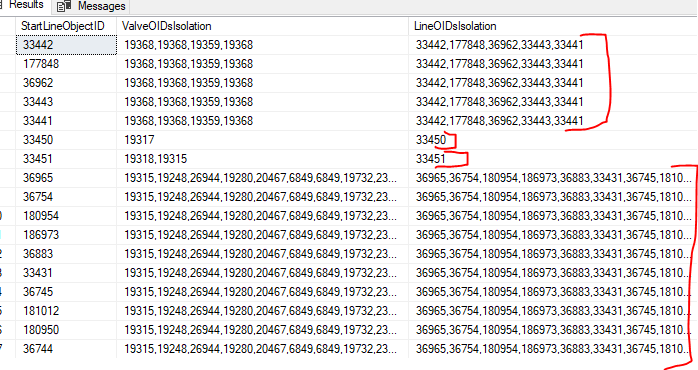
After reading through various documentation and searching the Community board, I have yet to find a summary that thoroughly explains - with full examples - what's possible for bulk tracing a UN.
I'm on Enterprise 11.3, UN version 7, Pro 3.3.3.
My goal is to use either Python API or ArcPy for the following:
While looping through each of our water UN's ~77,000 line features...
- Run an isolation trace on each feature, one at a time, and process the results for each trace. All I need are the "elements", no geometry.
- For each starting water line segment ObjectID, extract the isolated valve ObjectIDs and isolated line ObjectIDs and then insert them into a SQL table as comma delimited for easy database retrieval (e.g. "3815, 3940, 9914, 2147"). In this way, I merely run a database query instead of executing an actual trace in the front end application/script: "...where ObjectID In (3815, 3940, 9914, 2147)"
- This script would be run every so often (~ 4 times / year, maybe?)
Benefits of this approach:
- No worries about dirty areas preventing the UN trace from executing for end users. Tracing ahead of time assures me that nobody will see an error saying that trace cannot run. Our Technicians post to Default throughout the day. Even though they are in the habit of Validating the Default to clear out everything including the harmless "Feature has been modified" dirty areas, they may forget or there may be a real error that isn't resolved at any given moment.
- Lightning fast results for the front end application - for a single level isolation alone, but with this type of arrangement I could perform a double-level isolation very quickly which could be really beneficial in cases of a large main break so the crew knows for sure what all valves to close to guarantee water flow is blocked. Double level isolation may be rare, but it almost assures you that if the GIS data is off at least you have a safety net for identifying critical valves to close.
- The results can now be used for other asset management scripts/workflows that would not otherwise be feasible if you were analyzing the entire system and had to execute a trace for each feature. It could take days to run continuously, which is unrealistic, when a simple database query for each line segment would require a tiny fraction of that time.
What works, what doesn't, where I lack knowledge:
Before going into specifics, my frustration is centered around the fact that it's hard to find a method that allows me to dynamically define my starting point (as a mid-point of each water main) for each iteration and then retrieve results in memory...preferably while running against a no dirty area version that is free from interruptions.
- ArcPy Trace "arcpy.un.Trace(...)" - currently the only method that works well enough, if not ideal. I reference a starting points FileGDB (on C:\...) as the template. It has a single point feature. Using UpdateCursor I simply set the FeatureGlobalID of the current water main. It successfully completes the trace on a small scale so far, but I have to output the results to a physical JSON file where I then pull the "elements" properties and then delete the file...continue with looping.
In ArcPy I cannot seem to reference a version other than SDE.Default. I've tried appending syntax like this "?gdbversion=MyUser@Domain.TraceTesting" (both with and without forward slash before the "?") to the URL for the UN layer, but it doesn't seem to take.
- ArcGIS Python for API - (arcgis.features.managers module) - either I cannot get the syntax right or even if I could I'm not sure it'll handle the per feature input as with the arcpy trace (using a FGDB point). I'm fairly confident my input parameters are fed in correctly with the "trace" method:
TraceLocations = [{
    "traceLocationType": "startingPoint",
    "globalId": GlobalID, ## example: "{288D22C3-301A-44D1-81BA-E66F094413D9}"
}]

traceConfiguration = {
 "includeContainers": True,
 "includeContent": False,
 "includeStructures": False,
 "includeBarriers": True,
...etc.
}

resultTypes=[{"type":"elements","includeGeometry":False,"includePropagatedValues":False,"networkAttributeNames":[],"diagramTemplateName":"",
              "resultTypeFields":[]}]

trace_results = UtilNetMgr.trace(locations=TraceLocations, trace_type="isolation", configuration=traceConfiguration, result_types=resultTypes)
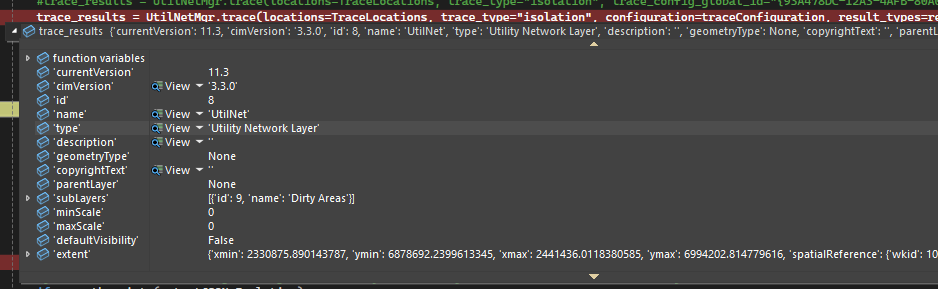
It's supposed to produce a dictionary with {"traceResults": {"elements": list,}"success": bool}
Here's how it looks when my trace completes. With all the variations I've tried, I never see "traceResults" or "elements" returned.
- REST API requests.post(service_url, data=payload, headers=headers) - it doesn't allow me to define a starting point dynamically while looping through my water line features. I can get it to run from REST endpoint using a Global ID of a water valve (device), but I cannot seem to get this approach to work as explained above. Can I reference local data? I don't want to store starting points in my enterprise geodatabase, since they change all the time with continual edits to our system.
- BatchTrace (Utility-Data-Management-Support-Tools) isn't a viable solution if you're trying to handle results for each feature. In theory it sounds good, but practically speaking it's highly inefficient and unrealistic. The tracing still takes 15 - 20 seconds per feature, which would mean many days of running.
---------------
Here's my strategy to be most efficient: Instead of having to trace all 77,000 features, what I'll actually trace will be much less - perhaps as little as 1/10 of this total. For each line traced, I'm capturing all the lines being isolated from that run. Therefore, I already know that full group of lines is covered by a certain combination of barriers (valves). So I can then insert all those rows into my SQL table before moving on to a new isolation area, if that makes sense. I really just need to trace one line segment for each isolation area/group. It could entail 2 lines total or it could entail 18 lines, but it cuts down on a lot of processing.