- Home
- :
- All Communities
- :
- Products
- :
- ArcGIS Survey123
- :
- ArcGIS Survey123 Questions
- :
- Re: Getting two previously entered values to displ...
- Subscribe to RSS Feed
- Mark Topic as New
- Mark Topic as Read
- Float this Topic for Current User
- Bookmark
- Printer Friendly Page
Getting two previously entered values to display together

- Mark as New
- Bookmark
- Subscribe to RSS Feed
- Permalink
Hello, I am working on a survey to take inventory of invasive plant species. I want the survey to display the species and percentage cover that was previously entered so the field techs can easily see what they've already recorded. Right now I have the species and coverage options as select_ones, and the display of what has already been used as a multiline text field with join(", ", ${Species_ID}) as the calculation.
Is there a way I can have it also display the percentage cover chosen for each species? And is there another way I get have is display better than a multiline text field, in case there's a lot of species in one transect?
Thanks,
Sophia
Solved! Go to Solution.
Accepted Solutions


- Mark as New
- Bookmark
- Subscribe to RSS Feed
- Permalink
Kinda of like this?
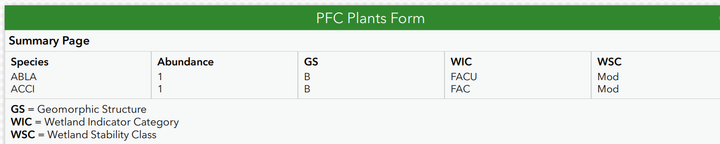
Two ways
Simpler option that may work is inside the repeat concat your two fields like concat(speciesfield, " ", cover field)
Then in your join use this new field instead join("\n", ${concat field above}) using new line to have each pair on its own line.
Fancy way in case you have more than just the 2. Create a grid to make a table then just have each field in it own cell again using join("\n", ${Species}) If you do each field in its own grid cell, since they are in the same order it will magically all line up for you.
Hope that helps
- Mark as New
- Bookmark
- Subscribe to RSS Feed
- Permalink
Kinda of like this?
Two ways
Simpler option that may work is inside the repeat concat your two fields like concat(speciesfield, " ", cover field)
Then in your join use this new field instead join("\n", ${concat field above}) using new line to have each pair on its own line.
Fancy way in case you have more than just the 2. Create a grid to make a table then just have each field in it own cell again using join("\n", ${Species}) If you do each field in its own grid cell, since they are in the same order it will magically all line up for you.
Hope that helps

- Mark as New
- Bookmark
- Subscribe to RSS Feed
- Permalink
G'day Doug - Can you please give advice on how this summary table will work if there is no value placed in one of the questions in the repeat? I am getting closer to what I need (but if a question was left blank in the repeat above, it throws the values out of order.

In my example I have three birds, the Pied Oystercatcher was seen at Dist100, but because there was no abundance data at Dist100 for the other two species, the value of '1' appears to be aligns with the Australasian Pipit, rather than on the third line.
Do you have any advice on handling this?
- Mark as New
- Bookmark
- Subscribe to RSS Feed
- Permalink
Trying to remember now but changing from dynamic to fixed grid may do it. Its on the settings sheet.
