According to The Hobbit and The Lord of the Rings trilogies written by J.R.R. Tolkien, Bilbo and Frodo were born during the Third Age in the years 2890 and 2968 (of the Shire calendar) respectively. Translated to our Gregorian calendar, Bilbo was born in 1290 and Frodo in 1368. Bilbo and Frodo share the same birthday on September 22 and that makes this day a very special one: Hobbit Day.
Go back?” he thought. “No good at all! Go sideways? Impossible! Go forward? Only thing to do! On we go!”
Bilbo Baggins, The Hobbit, Riddles in the Dark.
Survey123 version 3.6 is now available to all, even the Elves!
Critical fixes
This update includes over 30 critical bug fixes in the Survey123 web app and field apps. An area or particular focus has been ensuring a more correct and consistent behavior of your XLSForm expressions. For example, dealinig with relevant statements and submitted data. The general rule is that data should not be submitted from non-relevant questions. That is, the output of your calculations or default values set, will never be sent to ArcGIS for questions where the relevant expression evaluates to false. In addition, with this update relevant statements apply to hidden and calculate questions. Thus, the use of relevant expressions is reinforced not just as the means to hide questions, but also to better control what data is submitted to the target feature layer.
You will also find a list of device-specific fixes in this release. Barcode scanning capabilities have been greatly improved on Android devices, as well as other improvements to keyboard and input behavior. Others fixes relate to the new iOS 13 update, which introduced some changes affecting the Survey123 field app.
A list of critical BUGs (and relevant enhancements) addressed in this release can be found at the end of this doc.
Lines and polygons
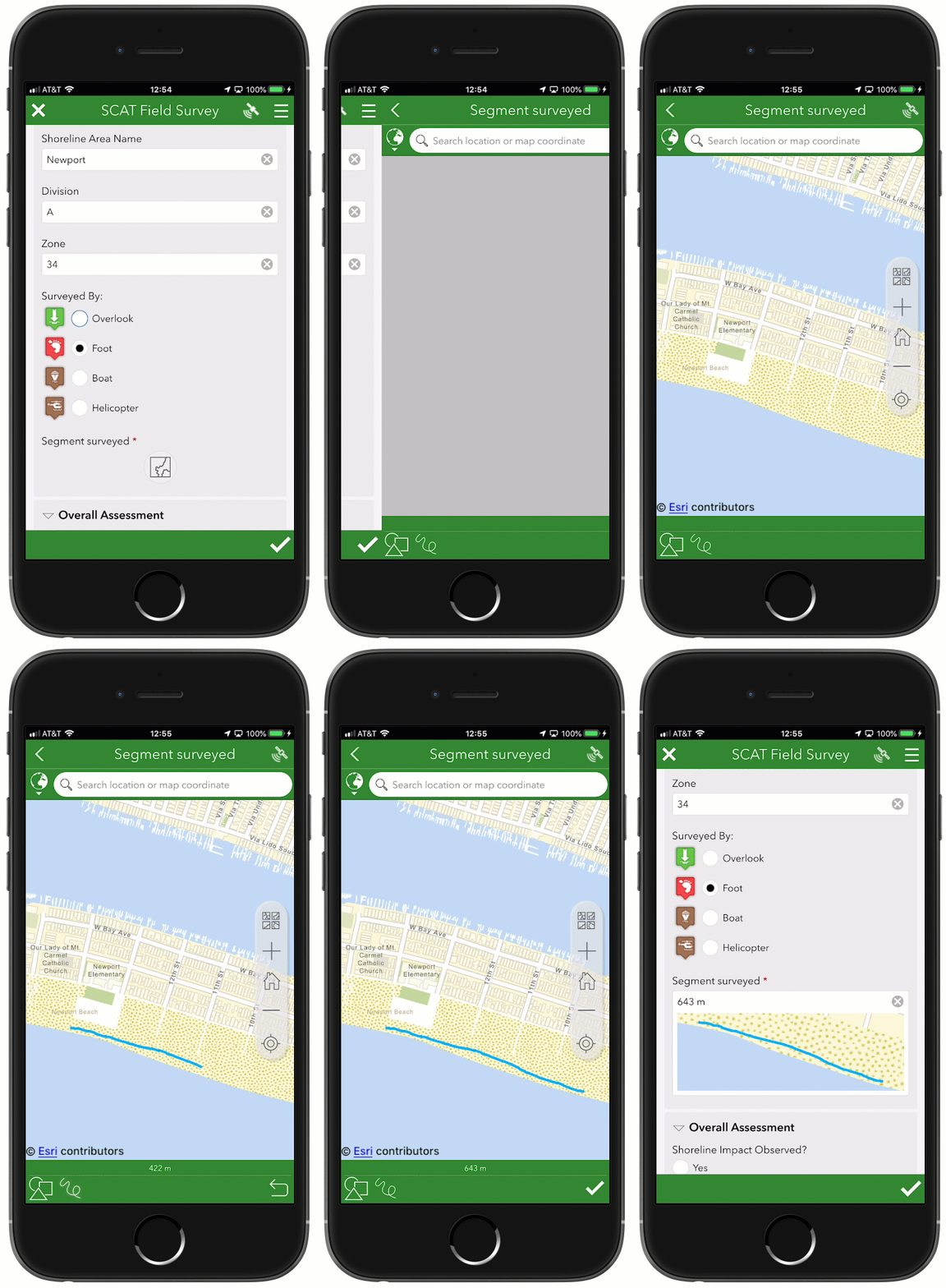
You can now work with line and polygon GIS features within the Survey123 apps. This is possible through the new geotrace and geoshape XLSForm question types, which you can incorporate into your surveys through Survey123 Connect for ArcGIS.
Geotrace and geoshape questions are similar to geopoint questions in that they are shown in your form as a map. The only difference is that with geotrace and geoshape you can create and update lines and polygons respectively.
Support for geotrace and geoshape is available in both the Survey123 field and web apps. That is, you can work with lines and polygons from a web browser and also from the native app. The website has also been updated so you can view, filter, analyze and even create feature reports with line and polygon data.
There is quite a lot to know when working with lines and polygons in Survey123. You can find more details in our https://community.esri.com/groups/survey123/blog/2019/09/26/survey123-tricks-of-the-trade-lines-and-polygons post.
Single choice grid in the field app
We introduced single choice grid in the Survey123 web designer and the web app at version 2.8. We are now expanding support to Survey123 Connect and the field app. Single choice grid allows you to compact series of choice list questions, reducing the need for end-users to scroll up and down the form. They can also help you make your forms more easily readable. The key to using single choice grid is a sequence of more than 2 or 3 questions sharing the same list choices. In XLSForm jargon: A sequence of select_one questions sharing the choice list. This new appearance is ideal when you plan on using forms with a tablet, although keeping labels short and choices limited can give you good results even in smart-phones.
In the next animation you can see a single choice grid compacting a set of 5 building condition questions. Note how the choices are labeled just once for the entire set.
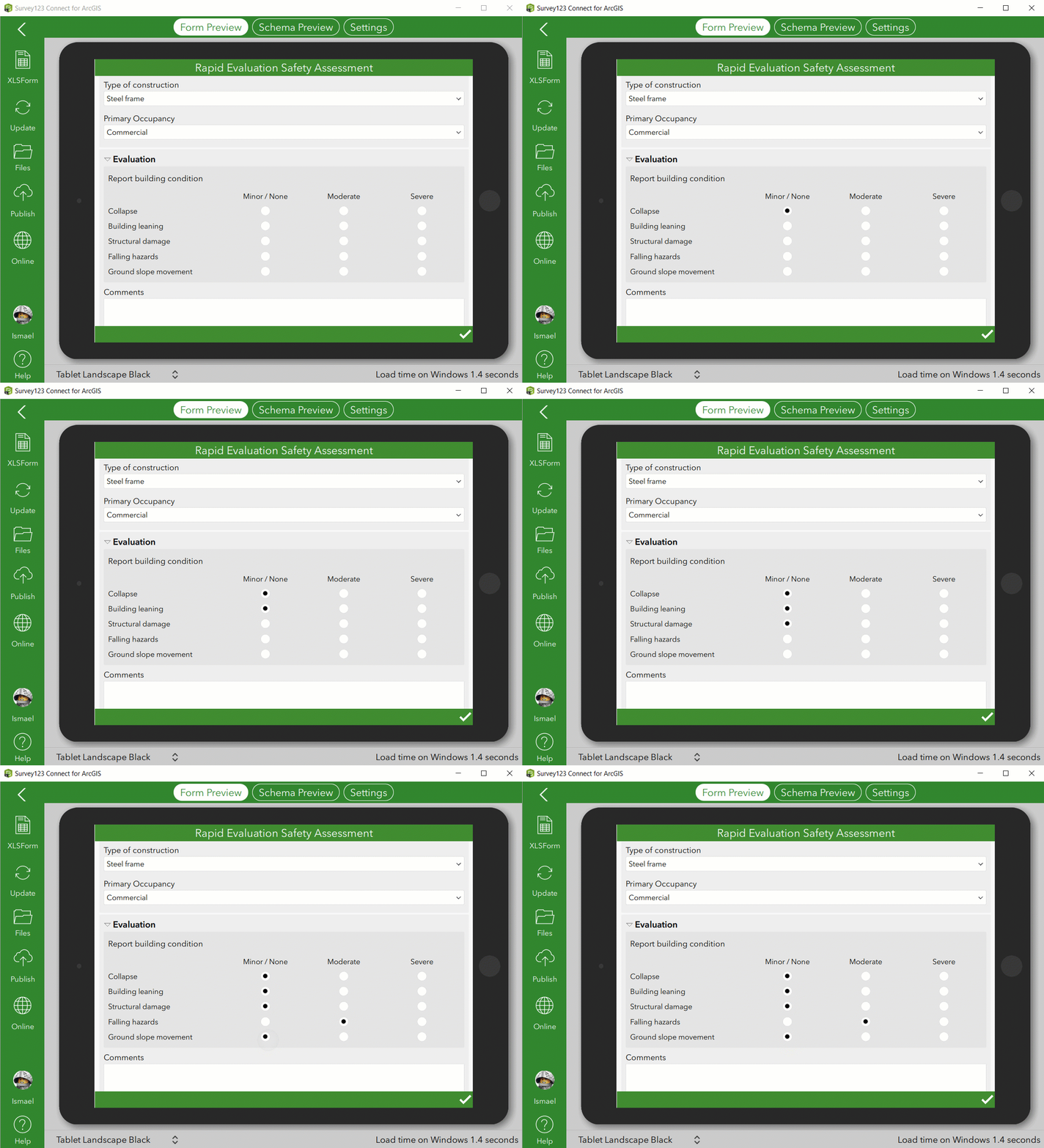
In XLSForm, you can add a single choice grid by simply enclosing your select questions within a group and setting the appearance of the group to table-list.
| type | name | label | appearance |
|---|
| begin group | assessment_group | Report building condition | table-list |
| select_one evaluation | assess_collapse | Collapse | |
| select_one evaluation | assess_leaning | Building leaning | |
| select_one evaluation | assess_structural | Structural damage | |
| select_one evaluation | assess_fall_haz | Falling hazards | |
| select_one evaluation | assess_group_mov | Ground slope movement | |
| end group | | | |
Please note that groups using the table-list appearance will take the whole width of the form when your form uses the theme-grid style.
Feature report enhancements
Survey123 feature reports allow you to create high quality printable documents from your Survey123 data. The layout, content and look and feel of your reports are defined in a Microsoft Word document template. For a basic introduction to Survey123's feature reports, refer to the https://community.esri.com/groups/survey123/blog/2019/07/23/understanding-survey123-feature-reports blog post.

This update includes a few refinements to the feature report syntax. You can now:
- Control how many decimals should be shown in a number. ${myNumber | round:2}
- Extract the elevation of a geopoint question. ${myGeopoint | getValue:"z"}
- Get the x/y coordinates of a geopoint in a particular spatial reference: ${myGeopoint | getValue:"x":26865}.
The template syntax validator has also been improved to handle some logical errors that were not handled before. In the past, these invalid expressions would pass the syntax validation and then be ignored at run-time. Starting with this release, you will get a validation error when you attempt to upload the template. For example, the following expression is incorrect:
${if image_field_1 | getValue:"size">0}
A parenthesis should be added as follows:
${if (image_field_1 | getValue:"size")>0}
Or alternatively, you could use:
${if image_field_1}
Another common syntax error is as follows:
{if choiceQuestion1="choice1"}
The equal sign above is used as an assignment. A double = sign should be added for a comparison:
{if choiceQuestion1=="choice1"}
A side effect of this more strict template syntax validation is that existing templates you may have uploaded will start triggering 'parsing errors'.
The complete feature report syntax is described at: Feature report templates—Survey123 for ArcGIS | ArcGIS
If you happen to be using Survey123 web hooks and Integromat with ArcGIS Enterprise, you will notice that you can now configure the Survey123 Integromat module to create Feature Reports with your own ArcGIS Enterprise instance.
Finally, be aware that coinciding with the upcoming ArcGIS Online update in October 2019, each feature report generated will consume 2.5 ArcGIS Online credits. Refer to https://community.esri.com/groups/survey123/blog/2019/07/23/understanding-survey123-feature-reports for more information.
Note to ArcGIS Online users: Coinciding with the upcoming ArcGIS Online update in October, Survey123 Feature Reports will consume ArcGIS Online credits.
Web form view-only mode
In most cases, you want to use a Survey123 form to help people capture data. Using web form URL parameters, your survey can be launched with some predetermined responses. You can also use URL parameters to load data from existing records into a survey and let people update that information. With this update, you can also open a survey in read-only mode. This can be done in two steps:
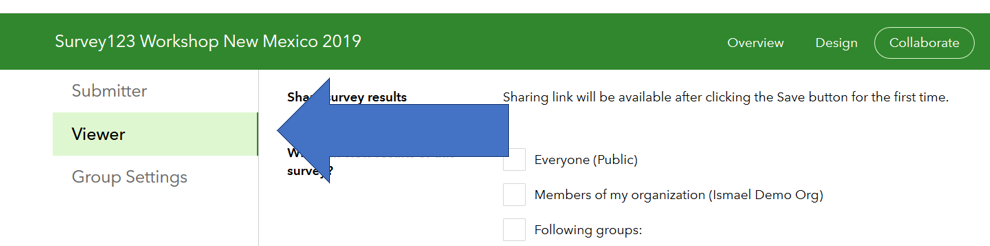
- Go into the Collaborate tab in the Survey123 website and share your survey results (Viewer tab) as appropriate.
- Build a URL setting the mode parameter to view, and pass the objectid of the record you want to display.
https://survey123.arcgis.com/share/1cb28b212b5542acbbdbaa35feba0765?mode=view&objectId=10
If you get an error like shown below, make sure you share your survey results through Collaborate as described in step 1 above.

As the mode=view parameter is only introduced with 3.6, you will need to republish old surveys to take advantage of this feature with them. Alternatively, you could also add the version=latest parameter to dynamically upgrade your survey when it loads in the user's web browser. However, it is generally best to republish the survey with the latest version.
Extended XLSForm support in the Survey123 field app
With this update, we are introducing a handful of very specific enhancements to our XLSForm support in the Survey123 field app. These new features are currently not supported in the Survey123 web app. Demand for these types of capabilities is much more general among Survey123 field app workflows, so we are introducing them in that context exclusively for now.
Range question
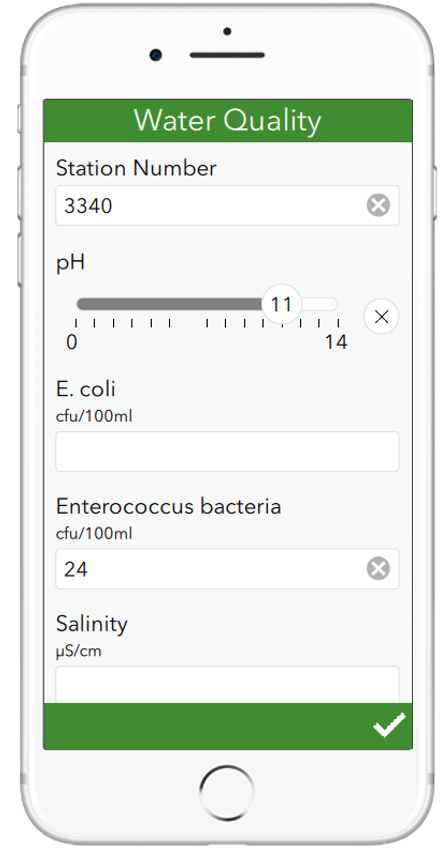
The range question is designed to restrict integer or decimal user input to a well defined range. If you setup your survey on top of an existing feature layer, range questions are a perfect fit for fields with a range geodatabase domain. Range questions display in your form as a horizontal slider, ideal for touch screens, although when the control has the focus you can also change its values using the left and right arrow keys.
In the screenshot on the right, you can see a range question being used to help users document pH values on a water sample. Values can be easily set between the pH range of 0 (acidic) and 14 (alkaline).
Through the XLSForm spec, you can dictate different aspects of the slider such as the minimum and maximum accepted values and the colors of the control. Like other XLSForm questions, you can apply calculations, data validation constraints, default values, etc.
Check out the Range help topic for more details.
Custom height for signature, text (multiline), and geo questions
You can now set a custom height for multiline text, signature and geo (geopoint, geotrace, geoshape) questions. This is particularly helpful when you arrange multiple questions in a single row using the theme-grid style, allowing you to adjust the height of different controls to keep your design more symmetric. In the case of text input, expanding the default height also helps signifying to the end-user that large amounts of text can be inputted.
The height is set using the body::esri:style column, which has been added to the far right of the XLSForm survey sheet. You can also manually add this column to old XLSForms you may have.
| type | name | label | appearance | body::esri:style |
|---|
| geopoint | location | Location | | height=15 |
| text | comments | Comments | multiline | height=7 |
| image | signature | Signature | signature | height=20 |
The height value unit is expressed as lines by default, where a line is the height of the current input text font. Alternative units include % (height=25%), where the height is calculated as a percentage of the current window height, and pixels (height=300pixels). Remember not to add spaces between the unit and the value!
Pictorial lists
There are a few common ways to represent a list of choices: a drop-down list, horizontally, vertically... etc. Carefully choosing the best style for a list, is important. A horizontal arrangement is a good choice for short lists, reducing the need for users to scroll the form up and down. Vertical lists present options in a very clean way, but if you have many choices, a drop-down list will save users time, particularly if you enable auto-complete.
There are some cases, where a pictorial representation of a list is by far the best option. Brett Stokes put together a nice collection of examples, which you can see in the animation below. In all these examples, making selections over the images comes more naturally than making the selection over a traditional list of choices. It is more intuitive, can be less prone to errors and quicker for the user to make their selection.
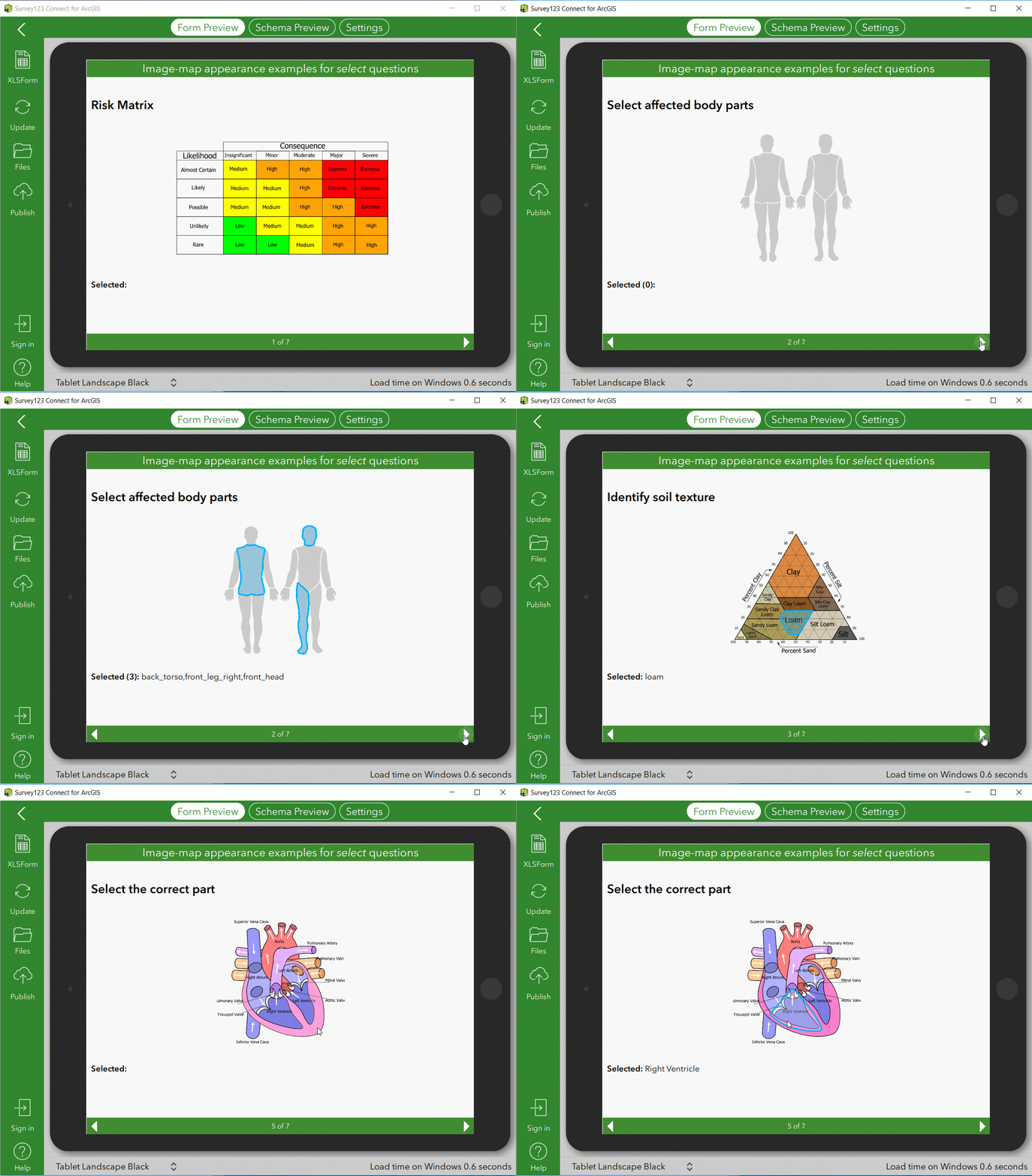
To learn about including selectable images in your smart form, refer to the https://community.esri.com/groups/survey123/blog/2019/09/26/using-the-image-map-appearance-in-survey123 post by Brett. Well worth a read!
Critical fixes and minor enhancements
Survey123 Field app (XLSForm support)
- BUG-000097105 Default values are present in fields that are not relevant.
- BUG-000124014 Non-relevant repeats are being submitted with values, if the default values or calculations are applied within the repeat.
- BUG-000123547 Unable to calculate geopoint locations when repeating a survey in the same survey form.
- ENH-000123296 Hidden and Calculate fields should support relevant expressions.
- ENH-000105822 Provide ability to create surveys using geometry types other than points in Survey123 (lines, polygons).
- BUG-000124284 Survey123 Connect for ArcGIS 3.5.x and Survey123 Field App 3.5.x do not hide questions accurately if a relevant column value is calculated on a complex pulldata expression.
- BUG-000124360 When manually entering Lat/Long for a geopoint location on a 'repeat' question, the 'device location' preview window does not show the device's location until the second repeat and onwards.
- BUG-000124121 If the spatial filter is enabled for a survey with a 'Query expression' in the 'Inbox Filter', records are omitted even if the records are within the map extent before clicking Refresh.
Survey123 Field app (device specific issues)
- BUG-000125295 The Survey123 Field App freezes/crashes when attempting to attach an image from the local device on iOS 13.1 Beta.
- BUG-000121080 Barcodes cannot be scanned in the Survey123 application on Samsung Galaxy Tab E.
- BUG-000123872 Survey123 Field app crashes upon launch on Android 5.1.1.
- BUG-000123228 The keyboard of Android devices with 5.2 inches or lesser screen size disrupts the Survey123 for ArcGIS app sign in page.
- BUG-000123572 Unable to connect error in Survey123 Field App 3.5.164 on iOS 12.3.1 device when Allow Location Access setting is set to "Never" or "While Using the App".
- BUG-000115243 The final page in Survey123 for ArcGIS App 3.0 installation wizard on Windows 10 German OS contains an action text that does not match the text indicated on the button below the text.
Survey123 Field app (Usability)
- BUG-000105325 Survey123 for ArcGIS maps do not automatically open to the Home extent as default behavior.
- BUG-000120565 In Survey123 for ArcGIS, Inbox icons in the Map View randomly turn orange or disappear after a point has been edited and sent, or when the Inbox is refreshed within the Map View.
- ENH-000107453 When using the Tab key to move through text questions in Survey123 field app on the Desktop, the survey does not scroll automatically.
- BUG-000124636 Editing the Signature field submitted using the Survey123 for ArcGIS field app creates a permanent black bar over the response.
Survey123 Web app
- ENH-000113292 Allow the pulldata(@property, utcoffset) function to be used in Survey123 web forms.
- BUG-000124448 Survey123 webapp version 3.5 fails to return addresses from geopoint using the pulldata() function when geopoint and address questions are in repeat.
- BUG-000122210 Reverse geocode fails to return results in the Survey123 web app when using a custom geocoder.
- BUG-000123616 In Japanese language, the data does not show correctly for multiple choice questions in the Survey123 for ArcGIS web app.
- BUG-000122892 When submitting the form several times in Survey123 for ArcGIS, the sentence mentioned for submitting another survey is misleading in French.
- BUG-000123376 The setting 'Show message to prompt the user to submit another record' is not honored when the survey is created from Survey123 Connect for ArcGIS.
- BUG-000118801 An existing secured ArcGIS Server feature service added to ArcGIS Online with credentials saved is not be able to attach images when using the web browser to submit the survey (the data is submitted, but not the attachments).
- ENH-000118845 Survey123 GeoPoint questions should have the option "Explore" on the Web Map, which activates zoom/pan on the Map.
- Multiple usability enhancements added to the map control, including an option to enlarge the map when working in a desktop computer and making map navigation easier.
Feature reports
- BUG-000111657 Photos submitted in landscape orientation in the Survey123 field app, result in poor quality when individual responses are printed or saved to PDF from the Survey123 website.
- BUG-000125306 Conditional statements for images with the relevancy setup are not honored in a feature report in Survey123 for ArcGIS.
Survey123 Designer and website
- BUG-000123663 The Data tab fails to zoom to the point extent initially for Survey123 for ArcGIS website.
- BUG-000124275 Ordnance survey basemaps that are specific to the UK act fuzzy within the Survey123 website.
- You can now manually set choice names for multiple choice questions in the the Survey123 designer.
- BUG-000125107 The Analyze tab at survey123.arcgis.com does not show the correct Bar Chart reports and percentages for surveys with multiple choice-questions configured with the Batch Editor option when the language for ArcGIS Online Organization is set to 'Japanese - 日本語'.
Security
- BUG-000124114 In an organization that does not allow HTTPS only, if a Survey123 for ArcGIS form is accessed via the item details page, the error message, "Request needs to be made over HTTPS" is returned.
- BUG-000122890 Survey123 for ArcGIS sends a query that is logically correct but appears as a potential SQL injection attack to firewalls.
Documentation
- ENH-000124633 Update Survey123 documentation to inform that 'Hints' are not supported within 'Repeats'.
- BUG-000124657 Update Survey123 with ArcGIS Enterprise documentation to provide more details on the limitations of creating feature reports with feature services hosted in Portal.