Showing results for 
Show  only  | Search instead for 
Did you mean: 

ArcGIS Survey123 Blog

Esri Notable Contributor Esri Notable Contributor Esri Notable Contributor
‎11-30-2017 09:01 AM
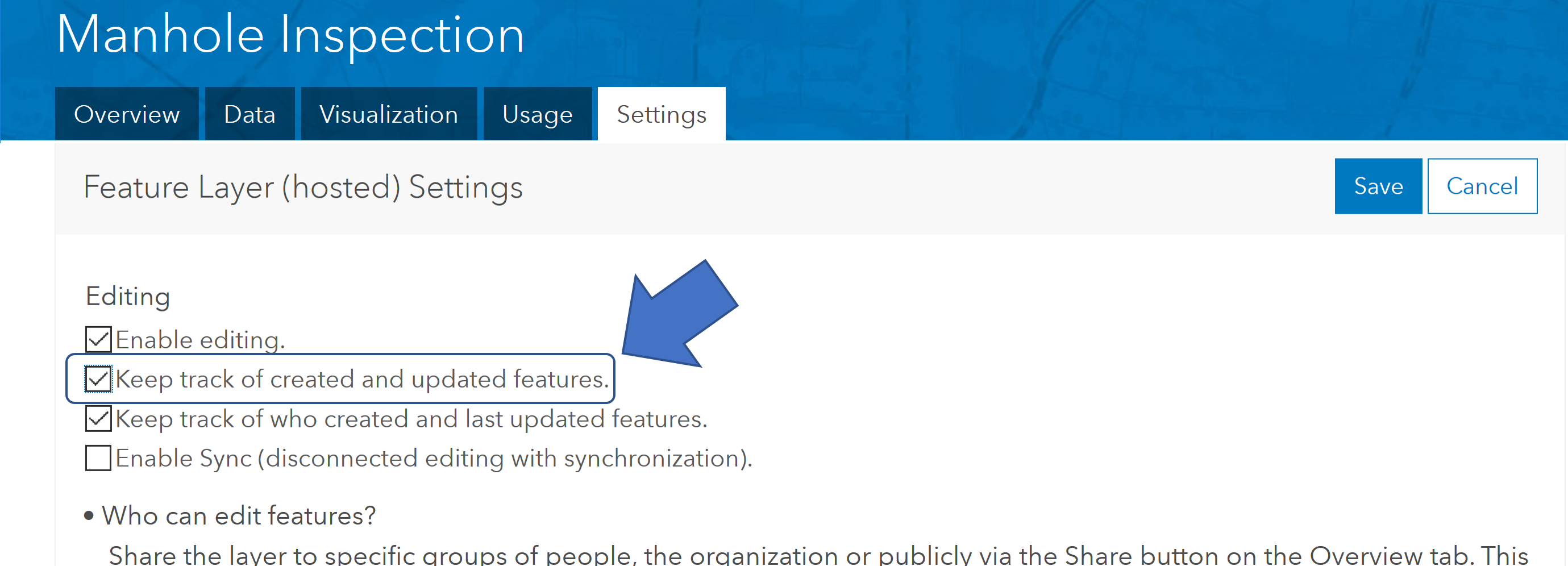
IMPORTANT NOTE: Content in this blog post has been revised in the https://community.esri.com/groups/survey123/blog/2018/01/22/a-simple-e-mail-notification-system-for-survey123-for-arcgis-v2 blog post.  The new blog as an improved version of the content... more
18 47 38.9K
47 Comments
Frequent Contributor

Hi Ishmael,

Thanks for this it's a feature we've been after for a while. I'm having a bit of trouble getting the email notification to work though. Can I use a gmail account as the sending email? I've tried the server settings with "smtp.gmail.com", "587" and "465" but am not having much luck. Are there other settings I need to include? Apologies as my experience with python and json is pretty much non-existent!

Kind Regards

Anthony

Esri Notable Contributor

Hi Anthony. The script at the moment is really setup to work with a simple smtp email server, typicalle running within your firewall, rather than through GMail, but I will look into this. There are some articles out there describing how to work with Gmail in Python such as this https://pybit.es/python-smtplib.html   I will research a bit and see how far this could be taken. 

Frequent Contributor

Thanks Ismael. I did try it with my work Outlook server but again couldn't get it to work. I will need to speak to my IT team to see if they can assist although they're not always the most approachable! Under the server section of the json file is any other information required for more complex email set ups other than the server name and port? Just so I know what to ask our IT team for.

Oh and thanks for all the great work on Survey123. We've just used it for a 15 page household survey in Africa and it's worked an absolute treat with many of the local surveyors preferring it to the traditional paper surveys.

Esri Notable Contributor

Hi Anthony. I added more details to the Red note in the blog where I describe how to setup the server connection properties. I made some changes in the code so we can handle Gmail like you want. Please download the source code again and follow instructions carefully.  Let me know how it goes!

Frequent Contributor

Hello,

Would these work with Collector for ArcGIS? What about Workforce for ArcGIS (I am research about it and not sure if it has notify included or not)? Please advise. Thank you.

Esri Notable Contributor

Hi Alex. Yes! It will work with ANY app. The Python script is really looking at your feature service, so even if you add your features  from ArcGIS Pro, Collector, Workforce a GeoForm, Web app or anything... it will trigger the email.

Frequent Contributor

This is awesome. I will check it out! Thank you!

Frequent Contributor

Thanks Ismael, that's fantastic! After a bit of trouble initially, which I realised was our firewall blocking my access to gmail, I managed to get this working on our public wifi connection. This is going to be very useful so thanks a lot for your efforts.

I've noticed that you receive an email for each change to the feature service. Is there a way to configure this to just inform you of the last change say if you just had the script run once each morning? I suppose my concern is that feature services that undergo a lot of changes may result in inboxes getting bombarded. Even in its current form though this is going to be great for making our surveys more widely available to the company.

Thanks!

Esri Esteemed Contributor

Hi Anthony,

To create a summary e-mail instead of oner per feature, you would need to modify the parseattributes functions (lines 257-283).  You would need to construct the full message from the parts (the msg variable inside the for loop, which is the feature-by-feature processing part) and have the sendMail function outside the for loop.  A quick version of this (not trusting this post to keep indentation correct; lines 258, 282-284 are the modifications):

Regular Contributor

Is there an issue using this with non HTTPs:// Urls. I'm receiving this message when running in IDLE.

raise MissingSchema(error)
requests.exceptions.MissingSchema: Invalid URL 'https//gistest.freshfromflorida.com/arcgis/rest/services/DPI/Tomato_Commodity_Collector/FeatureServer//0?f=pjson&token=hstq6tS5lgKwV77OfG4oRYkD1zrtFTdEl-GiSsoiCWlnouy6nFdlvP536SB4xhWm2XC7_EqAN2Q4Tg_qV-LAIdoBB2s-I5U5MComJSeDSqOwTks10-gsGEcSBU-bPkYd': No schema supplied. Perhaps you meant http://https//gistest.freshfromflorida.com/arcgis/rest/services/DPI/Tomato_Commodity_Collector/Featu...?

Esri Esteemed Contributor

Hi Glen,

it looks like your URL starts with https// , not https://

Regular Contributor

James,

the URL I'm using is just http://. I think somewhere in the python code it's trying to add the "https//".

{"fsURL": "http://gistest.freshfromflorida.com/arcgis/rest/services/DPI/Tomato_Commodity_Collector/FeatureServe...",

Esri Esteemed Contributor

Hi Glen,

One thing that I should have mentioned- this script is taking advantage of a change tracking feature that was introduced this year in ArcGIS Online and is coming with ArcGIS Enterprise 10.6 - it won't work with your ArcGIS Server. Additionally, I see that your https certificate on your server has expired - you should update that regardless

Frequent Contributor

Thanks for this James, looks like I'll have to scrub up on my python skills.

Occasional Contributor

Hello Ismael and James,

Thanks for this post!  It's very helpful, and with a little help from a co-worker (Tim Sexton) I was able to leverage gmail to serve the notification email(s).    I did have to specify port 587 and username/password following your instructions, but

there was also an edit needed within the original python script:

 Near line 296 change:  smtplib.SMTP(servername) to smtplib.SMTP(servername, srvrInfo[1])

then for the "server" config section in the json file, include the port number:

["smtp.gmail.com","587","googleusername","googleapp_password"]
The python script was missing the port information for the connection.

Have a great friday! 

Brian C.

Esri Notable Contributor

Thanks Brian for the catch! Source code updated with your fix.

Emerging Contributor

Hi James,

I am sending emails out from forms to indicate "Trail Status" for Taos Ski Valley. Many people like it. Like with all the projects that I have brought to production there are always "tweeks".

I am looking for a way to send the email output as HTML.

Any clues would be greatly appreciated.

I noticed that when I generate a report from survey123 website using an iPad. it creates "link html.DOCX". I like this as it opens a web browser and uses my template.

Thanks for all you do,

Esri Esteemed Contributor

Hi James,

I'd suggest looking at 18.1.11. email: Examples — Python 2.7.14 documentation - the last example shows how to set up HTML in an e-mail.

Regular Contributor

I moved the feature service to ArcGIS Online Hosted and  I am still not getting it to run. Any help would be appreciated. This is what I get when running in IDLE.

Status = Failed
Checking the result
Traceback (most recent call last):
File "C:\Test_TCS_SITES\DetectChanges.py", line 382, in <module>
main(configfilename)
File "C:\Test_TCS_SITES\DetectChanges.py", line 135, in main
changetype = resultjs['responseType']
KeyError: 'responseType'
>>>

Frequent Contributor


Traceback (most recent call last):
  File "Z:\Code\DetectChangesANDnotify\DetectChanges.py", line 23, in <module>
    from email.message import EmailMessage
ImportError: cannot import name EmailMessage

Emerging Contributor

James, (thank you so much for the good information)

You pointed me at the exact place to create an HTML email. I put HTML into the "msg" parameter.

I commented out "sendmail" 

Script still grabs cfg from .init file yet needs the mime part to be populated with values to send email.

#You must import two modules

from email.mime.multipart import MIMEMultipart
from email.mime.text import MIMEText

#this is the HTML "wrapper" for the email

msg = msg + '<tr><td>{}</td><td>{}</td></tr><table border = "1">\n'.format(falias, val)
htmlTop = '<html><head><body></head><table style="width:100%"><table border = "1">'
htmlBot = '</body></table></html><table border = "1">\n'
msg = htmlTop + msg + htmlBot

htmlMsg = MIMEText(msg,'html')

# This is the mime attachment part of the script

htmlMail = MIMEMultipart('alternative')

htmlMail["Subject"] = cfg['email']['subject']
htmlMail['From'] = cfg['email']['from']
htmlMail['To'] = "Address.skitaos.com" #cfg['email']['recipients']
htmlMail.attach(htmlMsg)

s = smtplib.SMTP("SMTP.SKITAOS.COM")
s.sendmail(cfg['email']['from'],"Address.skitaos.com",htmlMail.as_string())
s.quit()

Below is what the output looks like in the body of the email

# you can configure text in "open" and "closed" within survey123

#if(selected(${Lower_Frontside_Green},'Strawberry_Hill')and selected(${qual}, 'yes'), '<font color="green"><b>OPEN<b></font>' , '<font color="red"><b>CLOSED<b></font>')

# I used a conditional statement to populate open or closed from a select multiple question (everything is closed) unless you select it.

#Ski patrol sends a survey from WiFi iPad and record is detected with script (it is mailed to distribution list setup using outlook)

#script is running on server that is maintained by IT support system (battery and generator backup)

Thank you ESRI staff and James Tedrick 

This leverages my organizational account to provide reporting to all that need it (and it comes directly from ski patrol)

New Member

Hi Ismael, I find you post very useful, but Ive been having issues installing the requests/pipenv I get this errror whenI  try to follow the steps in installing pipenv " Could not find a version that satisfies t No matching distribution found for pipenv"

I will be grateful for your assistance please. Thanks

Esri Esteemed Contributor

Hi Patrick,

What version of Python is installed on your computer?

New Member

Hi james,

I am using Python 3.6.4. thanks

Esri Esteemed Contributor

Hi Patrick,

Also, to check, if you open a command line window and type 'python', the Python shell starts up?  From the sounds of it, the most likely issue is that the Python installation is not present in the PATH variable in Windows.  python - How to add to the pythonpath in windows 7? - Stack Overflow  provides instructions for setting this.

New Member

Hi James,

Please I am still having same errors haven gone through the steps, please can I suggest we set up a short skype call for you to assist me?

Occasional Contributor

I get the same error.  Any thoughts on this?  Thank.

Traceback (most recent call last):
  File "C:\Users\rcolwell\Documents\DetectChangesv2\DetectEdits.py", line 19, in <module>
    from email.message import EmailMessage
ImportError: cannot import name EmailMessage

Esri Esteemed Contributor

What version of Python are using?  It looks like you might be using version 2.x; the script is written for 3.x.

Occasional Contributor

Thanks!  That was it.  I guess I thought I had that part covered because I have ArcGIS Pro2.1 installed on this machine.  I appreciate your response though, as it forced me to check!

Frequent Contributor

thanks for the inspiration!

I did something very similar, but created a PDF via XML/XSLT.

  • survey123 sets ${already_emailed} = 'NO' by default
  • query hosted feat. service for already_emailed = 'NO', return FeatureSet (bummer how this doesn't contain domains) via REST
  • query domain info for each field via REST: /service_1232/FeatureServer/layerID
  • logged BUG-000111606, queryDomains doesn't work for hosted feat. services
  • set already_emailed = 'YES' via REST: /applyEdits
  • open template XML file, loop over featureSet. Populate fields, use XML attributes to specify field has domain/not.
  • style XML file using XSLT template via Etree module. This exports an .html file
  • Convert .html to .pdf via pdfkit module
  • Email PDF report to project manager via cronjob

Best part is that all we have to do is point this .py to a new hosted feat. service (survey123 database) and it will start firing off new reports based on any fields!

Emerging Contributor

Hi Ishmael and James,

I am looking for a way to update a AGOL feature layer whenever a Survey is submitted. For instance, whenever a hydrant is flushed and record is submitted from Survey, the LastFlushed date will be updated for the hydrant layer. After reading this post, I think that I may use the similar approach. Instead sending a email, a REST post could be sent to update the feature. Before I give a try, I'd like know is this the best way to do? Is there a way to execute a REST post along with the Survey submission?

Thanks,

ming

Regular Contributor

Oops, I logged in with another user name. Please replay to this one instead the post above.

Ming

Frequent Contributor

the features are automatically updated when a new form is submitted, try using the refresh interval in map viewer if you're not seeing the updates.

Regular Contributor

Hi Joe,

I may not explained clearly. The survey is based a flushing table related to hydrant feature layer.  Every time when a survey is submitted, a new records is added to the table and I users can see it.  However, the feature layer is NOT edited. Therefore, I'd like to have a way to update the LastFlushed field after a survey is submitted.

Thanks,

Ming

Esri Esteemed Contributor

Hi Ming,

Yes, the script above could be modified to do an update on features via REST.  Some familiarity with the REST API, particularly Query (Feature Service/Layer)—ArcGIS REST API: Services Directory | ArcGIS for Developers or Query Related Records (Feature Service)—ArcGIS REST API: Services Directory | ArcGIS for Developers  (to find the correct record and Apply Edits (Feature Service/Layer)—ArcGIS REST API: Services Directory | ArcGIS for Developers (updating the record) would be required.

The equivalent area in the ArcGIS API for Python (which would be a little friendlier) isarcgis.features module — arcgis 1.4.2 documentation 

Frequent Contributor

I do something similar; default when survey123 form is submitted is already_emailed = NO. I just run the .py via task scheduler, kick out an email with a PDF report, then set already_emailed = YES via REST API.

Here's some pseudo code, (no code bashing please )

def gentoken(username, password, referer, expiration=5):  
    query_dict = {'username': username,  
                  'password': password,  
                  'expiration': str(expiration),  
                  'client': 'referer',  
                  'referer': referer,  
                  'f': 'json'}
    tokenUrl = "https://ourportal.com/portal/sharing/rest/generateToken"        
    tokenResponse = urllib.urlopen(tokenUrl, urllib.urlencode(query_dict))     
    token = json.loads(tokenResponse.read())            
    if "token" not in token:  
        print token['messages']  
        exit()  
    else:  
        # Return the token to the function which called for it  
        return token['token']
def applyUpdates(featureList,accessToken): #returns json string of POST reply
    payload = {'updates': json.dumps(featureList),
                'token': accessToken,
               'useGlobalIds': 'true',
               'f': 'json'}
    query_string = urllib.urlencode(payload)
    q = "/applyEdits"
    url = baseURL + layerID + q
    req = urllib2.Request(url,query_string)
    resp = urllib2.urlopen(req)    
    return json.loads(resp.read())
#URL of hosted feature service
baseURL = 'https://ourportal.com/server/rest/services/Hosted/service_9ca0ddc438704f38970558c39a245ef1/FeatureServer/'
#layer id in feature service we want to work with
layerID = '0'
#REST query string
where = '"already_emailed" = ' + "'NO'"
#REST query fields
fields = '*'
#lets get a token   
token = gentoken(USERNAME, PASSWORD, REFER)

#construct REST query
query = "/query?where={}&outFields={}&returnGeometry=true&f=json&token={}".format(where, fields, token)
fsURL = baseURL + layerID + query

fs = arcpy.FeatureSet()
#load json string from server into feature set
fs.load(fsURL)
#convert json string from server into py dictionary
pDict = json.loads(fs.JSON)
#unecessary, but lets load our edited feat dict to a new list to send back to server
newFeatList = []

for feat in pDict['features']: #returns list of features
    newDict = {}
    newDict['geometry'] = feat['geometry']
    glid = feat['attributes']['globalid']
    oid = feat['attributes']['objectid']
    newDict['attributes']={'globalid':glid,'objectid'Smiley Surprisedid,'already_emailed':'YES'} #editing already_emailed here
    newFeatList.append(newDict)
Regular Contributor

Hi Dan and James, 


Thanks for reply!  I started to write the code and it seem I am on the right track!

This is my second Python project and is a good practice for me. 

Ming

Anonymous User

Thank you for this script. However, I can't seem to get past this error:

I configured the Feature Service as indicated:

..and adjusted the json accordingly..I would note that not adding the '6' at the end of the 'fsurl' results in additional errors.

I spoke with IT to ensure the SMTP settings were correct and they are. Currently at a loss with the error because I can otherwise access my feature service directly in the browser...

Just looking for some direction as to how to troubleshoot further..

Thanks

Esri Esteemed Contributor

Hi Anthony,

The issue is the fsURL setting in your init file - you are pointing to the feature layer (/FeatureServer/6) and not the feature service (just /FeatureServer/) - the number is specified (in your case correctly) in the fsLayerNum setting.

Anonymous User

James,

Hello and thanks for the input. However when stating the json statement as originally intended I get a KeyError:

I played around with the init file and thus my original post. In fact if I manipulate further:

I get this:

Of course the error is an invalid query parameters but removing "../6/query " from the string takes me back to my original error.

Esri Esteemed Contributor

Hi Anthony,

Can you confirm you are using the latest posted version of the script?  I am seeing a major line discrepancy - the line 116 in your error message is line 135 in the version I downloaded today to examine.  In particular, it looks like you might be missing the code that loops through the job status to await the change report.

Anonymous User

Hi,

I was wondering if Webhooks or this notification system works with Collector. We collect species data using Collector and want to setup a notification system so that when a specific type of observation is made, the concerning department is notified. Any advice/ suggestions will be greatly appreciated.

Thanks

PJ

Esri Esteemed Contributor

 PJ,

Currently webhooks do not work with Collector.

Frequent Contributor

Has anyone got this to work with "fsLayerNum" = anything other than 0 ?

It works just fine if I use layer zero.  But, if I try any other fsLayerNum in the same hosted feature layer(s), I get the response error as @GlenGardner1 shows above.


Traceback (most recent call last):
  File "\\a19\detect_data_changes\DetectChanges.py", line 380, in <module>
    main(configfilename)
  File "\\a19\detect_data_changes\DetectChanges.py", line 135, in main
    changetype = resultjs['responseType']
KeyError: 'responseType'


@JamesTedrick  I also noticed that no error file is written for this error.

Thanks,

R_

MVP Notable Contributor

Turns out that since I had already ran it on layernum = 0, the  layergens file created is specific to that layer.  If I ran layer 1 intitally, then the error is reported when trying to switch the layer number in the init.json to layer 0.  Even deleteing the layergen file doesn't "reset" it.

Simply changing the layernumber in the init.json doesn't work.  You need to also have a different layergens file for each layer that you want to run this against, then all seems to be running fine.

 "layergens": "unique_name_4_each_layer.json"

 R_

Regular Contributor

Hi @IsmaelChivite or @JamesTedrick 

I know this is an old post and now you can use Zapier or Make to send out instant email notifications. I have a form set up for people to RSVP, and I've been asked if I can send out notification emails of the upcoming event to the people who have RSVP. Is there a way to send future notification emails?

Kind regards,

Jerry

Occasional Contributor

I see that this was posted long ago, but I am attempting to use this with Enterprise 11.1 and keep getting an error related to generating a token. Having looked at the script and init file, there is nothing that should cause a problem. But I am guessing that in the time since this was posted the security has escalated and needs to generate a token to access resources. I appreciate if anyone has any ideas.