Select to view content in your preferred language

How to set join operation (1:1 vs 1:M) when creating a Joined View

69
4
yesterday
AaronKoelker
Frequent Contributor

Hello. I'm attempting to create a Joined View via the ArcGIS API for Python and ArcGIS REST API. I've seen examples that say to first use create_service() to create an empty feature service (with is_view=true) and then use add_to_definition() to add layers and set up the join via "relatedTables". Within the relatedTables is a "type" property to set the join type (LEFT, RIGHT, INNER, FULL), but I haven't found anything on how to set the join operation, aka join relationship (one to one versus one to many).

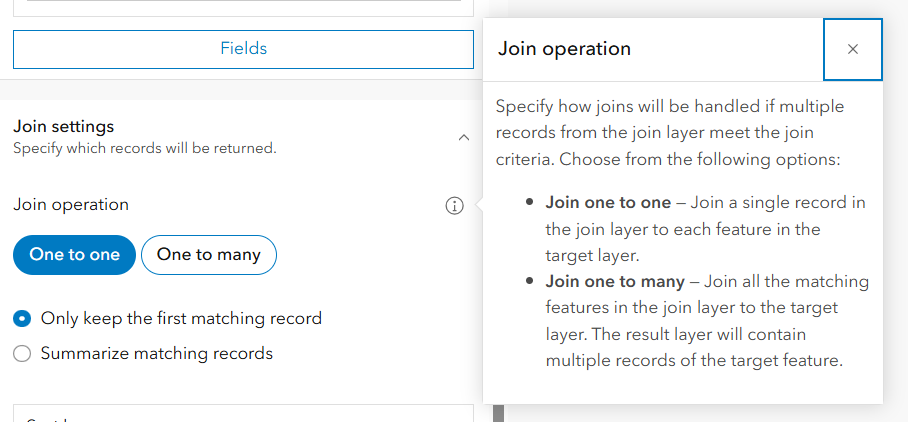
If I go to create a Joined View manually in ArcGIS Online there is an option for it, but I'm unsure how to set this via the API. I've also been unable to figure out how/where to check for this property on existing views that have been created manually (was hoping I could find the property that the API wants from there). There doesn't seem to be anything related to that in the service JSON, though. 
AaronKoelker_0-1766072162986.png


-Aaron
0 Kudos
4 Replies
RyanUthoff
MVP Regular Contributor

Does this tech support article help any? If you go to step 6, you can see how they specify the join type (in the case of the example, it is a LEFT join).

https://support.esri.com/en-us/knowledge-base/how-to-create-a-joined-hosted-feature-layer-view-using...

0 Kudos
AaronKoelker
Frequent Contributor

@RyanUthoff Thanks for the link Ryan, that is one of the examples I'd looked at but I don't believe it answers my question. I believe the type of join (left, right, inner, full) is separate from the join relationship or cardinality (one to one (1:1) versus one to many (1:M)), though I could be mistaken. When you go to create one of these manually in the builder, those are two separate questions/settings. In the documentation, the only values listed for the "type" property are LEFT, RIGHT, INNER, FULL

AaronKoelker_0-1766077727818.png

I expect that it treats it as a 1:1 join by default, but unsure how to tell it I want a 1:M. 

-Aaron
0 Kudos
RyanUthoff
MVP Regular Contributor

Oh, I misunderstood. I thought you were asking how to specify the join type (LEFT, INNER, etc.).

I'm not able to find any documentation about that either. But, now I'm curious so I took a deep dive into it. I looked at the internet traffic and compared the requests for one to one vs. one to many, and I did notice some differences.

Often times, the API parameters will match the internet requests. So if I can see what the internet request is doing, I might be able to track it back to the API. For example, I am able to see the "Type" parameter (for the join type) in the internet request.

In the case of the join operation, I'm not seeing anything obvious (like where it is explicitly called out). However, this is added in the request for a one to one join operation.

"topFilter":{"groupByFields":"FieldName","orderByFields":"OBJECTID ASC","topCount":1}}]

Besides that, everything is the same for one to one vs. one to many. So.....looking at the relatedTables documentation you provided, there is a groupByFields parameter. So, you might be able to specify the groupByFields parameter (to the field name of the child table) and it's possible Esri will treat it as one to one.

And if you don't specify it, it might treat it as one to many by default.

With all that being said......Esri should definitely make that option easily available like they do with the join type. There's no guarantee that anything I said will work and correctly specify the join operation, but it's something to look into.

0 Kudos
AaronKoelker
Frequent Contributor

Thanks @RyanUthoff , that's a good catch. I was starting to wonder if it might be something like that—no specific property but determined by the presence or absence of something else. I'll keep poking around with that topFilter / groupByFields parameter. 

-Aaron
0 Kudos