Select to view content in your preferred language

Limit Geocoded Intersection Candidates to City in which intersection is located

824
2
11-14-2023 08:07 AM
JoeHeggenstaller
Regular Contributor

Is there a way to limit geocode suggestions for an intersection to only show a candidate for the city in which the intersection is actually geographically located?

Our 911 Computer Aided Dispatch (CAD) system leverages Esri Address Point and Street Address locators for providing call location addresses through a customized interface, not via ArcMap/ArcGIS Pro. When a 911 call taker enters a street intersection that is near a city border they are provided with two address candidates. We want to only show the candidate for the city that the intersection is actually located within. We don't want the adjacent city candidate to be presented as an option. It is a waste of precious time if the user unknowingly selects the adjacent city candidate, then zooms to the map to see the geocoded result is not at the physical intersection (Think motor vehicle accident). Depending upon the location of an incident different agencies will respond to a call, so it is important that we pick the correct city.

"Washington" is the "correct" city in the example shown below. Millbrook Village is the adjacent city candidate, which we don't want to be presented as an option. (This example is illustrated using ArcGIS Pro, but the CAD system uses a customized interface.) Purple is the city boundary.
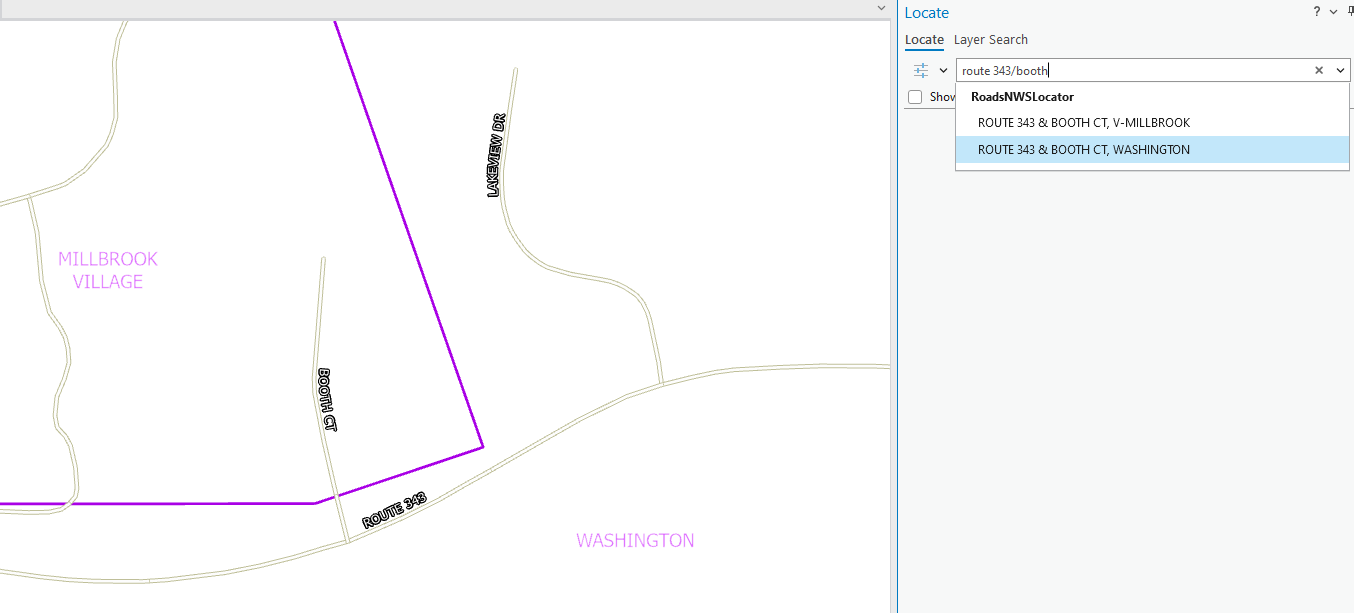
ArcPro-Geocoded-Intersection.png

I tried various Match Options combinations of "Match with no Zones" and "Comprehensive Zone Matching" settings and rebuilt the locator, but they don't seem to have any affect on the results. I still get two candidates for the intersection.

Anyone been able to solve this issue?

I'm using ArcGIS Pro 3.2, but this issue has been happening since the ArcMap 10.X days as well. The reference dataset is a road centerline file with address ranges and left/right city attributes as well as the other road name information, of course.

(Note: I am not able to create an "intersections" dataset that has all the "valid" intersections by municipality. We don't have control over the underlying programming framework or implementation in the proprietary CAD software.)

Thanks in advance.

2 Replies
FrankSimek
Emerging Contributor

Hi Joe,

were you able to resolve this issue. Our city is experiencing the exact same issue in our CAD system - our call takers are seeing multiple candidate suggestions when searching for an intersection that exists near adjacent municipalities. 

Here is a snapshot of the locator service and a typical intersection search that is returning multiple candidates due to variances in the CityL and/or CityR between the intersecting street segments.  

FrankSimek_0-1739972307245.png

Any information on how to designate the "City" that the actual intersection exists within would help us out tremendously.

Thanks 


0 Kudos
JoeHeggenstaller
Regular Contributor
Hi Frank,

Unfortunately, we haven't found a solution to the issue. I've tested ArcGIS Pro 3.4.2 which has Esri's newest geocoding format/engine and it still works the same way. Theoretically, this is probably by design to provide more options for results, but for our purposes it causes issues.

I ran a small test case that could work if you only need to geocode to intersections but would need more extensive testing. I created a point feature class of road intersections and manually added a few points with two attributes "Intersection" and "Municipality". I populated the attributes with the "correct" intersection that is our desired choice. I then created an address point locator using that feature class and those two fields as input. I was then able to use that locator in ArcPro and the only options for the autocomplete were the intersections that I designated. But that was only helpful if you were solely relying on that locator. If you create a composite locator that starts with an address point locator, then cascades to the intersection point locator and then finally your road centerline locator. When you use this composite locator you are presented with "all" the intersections that are relevant to the Intersection locator as well as the road centerline locator. The intersection locator choices are presented with a higher priority in your results, but you also receive the intersections that show both municipalities as part of the road centerline results. Either way, this intersection layer didn't help our situation.

Good luck.
0 Kudos
