- Home
- :
- All Communities
- :
- Products
- :
- ArcGIS Pro
- :
- ArcGIS Pro Ideas
- :
- Label leaders should not cross
- Subscribe to RSS Feed
- Mark as New
- Mark as Read
- Bookmark
- Follow this Idea
- Printer Friendly Page

- Mark as New
- Bookmark
- Subscribe
- Mute
- Subscribe to RSS Feed
- Permalink
As shown in the attached image, the label leaders cross. I'm using Maplex. A search of the forums and help does not offer instruction how to set Maplex to avoid this.
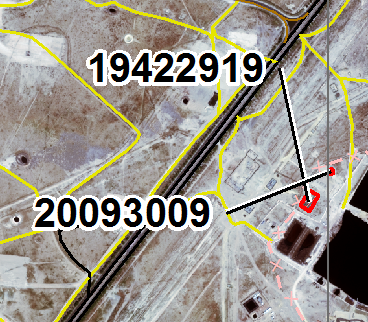
If I use standard labeling, one label loses a leader but at least the positioning makes sense:
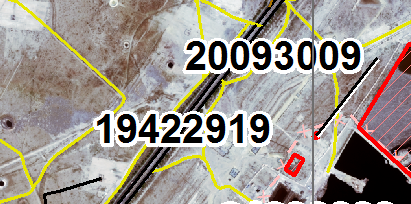
Please ensure Maplex does not produce overlapping leaders.
- « Previous
-
- 1
- 2
- 3
- Next »

@WendyHarrison just found this Idea.
Leader Lines have always been crossing? Now reading that it is not normal and should not happen is a bit funny.
Commented so that absence of evidence doesn't become evidence of absence. Would Kudos if possible.
When I next do something that ends up with crossed lines I'll see what the security level of the data is, and then decide if lodging a case with the locals is warranted.
I did something a few weeks ago on a mine site that ended up with crossed lines - default workaround if Maplex loses the plot is to convert to Annotation and go from there. Takes less time to just edit and go, than trying to coax Maplex out of the corner.
Project owner would 100% not want this data sent out all over the world.

I experienced crossed leader lines in 2025. This is not 'closed.'


My leader lines have always crossed on every ArcGIS Pro version I've used since 2.x up to 3.2.x now. I never knew the intended behavior was to prevent crossing. I've always had to convert to anno/graphics and go manual if I wanted complex leader-line/callout labeling to look decent for production.


Hi all,
With each release we include improvements to the Maplex label engine. If you see this issue with crossing leader lines, please contact support with the data and we can look into resolving it.
https://support.esri.com/en/contact-tech-support
thanks
Wendy
Hi @WendyHarrison
Now that you are aware that many of us think crossed lines is just normal Pro behaviour, and the fact that the majority of users will likely not be lodging a case against 'normal' behaviour, I'd suggest updating this Idea to 'Under Consideration'.
While making your improvements for each release, the devs can have a sticky note on their desk to also write tests to see why this, now abnormal, behaviour is allowed to take place.
It is quite simple. Crossed lines happen. That means your code allows it to happen by not being able to detect when it happens.
Having man-hours spent across the globe to lodge cases, creating dummy data, documenting it to make it repeatable by the local resellers, who then have to do the same for pushing it up the tree is not being efficient.
The Ideas site is meant for enhancement requests to the software - new functionality. Crossed leader lines are not normal and if we have a case of them it will be considered a bug and a reproducible case needs to go through Technical Support.
We need to figure out why you are seeing the leader lines cross. Do you have the Never remove setting enabled? This would be the first thing to look at and having it checked will result in crossed leader lines as the label will place instead of going unplaced due to the crossed leader lines. See image below

Have you reviewed the Label Summary for any out of the ordinary settings?

I recommend submitting a reproducible case to technical support.
@WendyHarrison Thank you, that is exactly the kind of basic information we were looking for! It wasn't apparent to me that this rule is the only thing preventing/allowing crossed leader lines, as place overlapping option overrides other proximity issues in addition to leader lines.
The documentation you linked doesn't mention callout/leader lines but now it makes more sense to me. That would be great to have this issue added to documentation as well.
Given that info, I wonder if we ought to create a new idea that increases the granularity of these rules regarding 'forced label drawing' beyond this one monolithic option. I wonder if there could be sub-options that, for example, do not allow crossing leader lines in particular while still forcing all labels to draw.
This probably means such an option would have to make exceptions or trade-offs, that maybe the user could provide weights for these exceptions. For example, make offset value exceptions (more or greater than what is defined in preferred/maximum offset), or 'External Zones' exceptions to force placement of callouts in different angles around a feature beyond what the user specifies. Things like that would be great to have to dial in callout labels a bit further.
@WendyHarrison
So it is expected behaviour? "having it checked will result in crossed leader lines"
So how is this Idea not valid?
Please mark as Under Consideration and please continue to work at the Maplex logic so that the clear example in the OP does not occur even if Never Remove is enabled.
I understand that there is a significant level of complexity in labels that has to be carried by someone in the map chain. That will be the user (current) to figure out workarounds, or your developers who have to continue to extend their checks and logic.
They still cross:


It's possible some other conflict of settings is forcing the crossed leader lines. Maybe there should be a 'Never Cross' option.
You must be a registered user to add a comment. If you've already registered, sign in. Otherwise, register and sign in.