- Home
- :
- All Communities
- :
- Products
- :
- ArcGIS Pro
- :
- ArcGIS Pro Ideas
- :
- Improve ArcGISIndexingServer
- Subscribe to RSS Feed
- Mark as New
- Mark as Read
- Bookmark
- Follow this Idea
- Printer Friendly Page

- Mark as New
- Bookmark
- Subscribe
- Mute
- Subscribe to RSS Feed
- Permalink
I appreciate what ArcGISIndexingServer.exe is doing to improve performance of ArcGIS Pro but I think there could be some simple improvements. It's currently a memory hog and brings my computer to it's knees regularly.
Quiet regularly I have to kill the process as it stops my workflows.
My Ideas:
- Only Index what about 4 levels deep on my favorites..
- Don't update so thoroughly so often
- Restrict it to using 80% of system memory as windows reserves a decent chunk for caching of currently accessed files..
- Leverage the windows indexes
- Build the index on disk first then load to ram for optimization when the screen is locked.
- Build the index in parts
What Happens now
Things slow down or even stop working/crash

Check Task Manager shows how much ram ArcGISIndexingServer.exe is using.

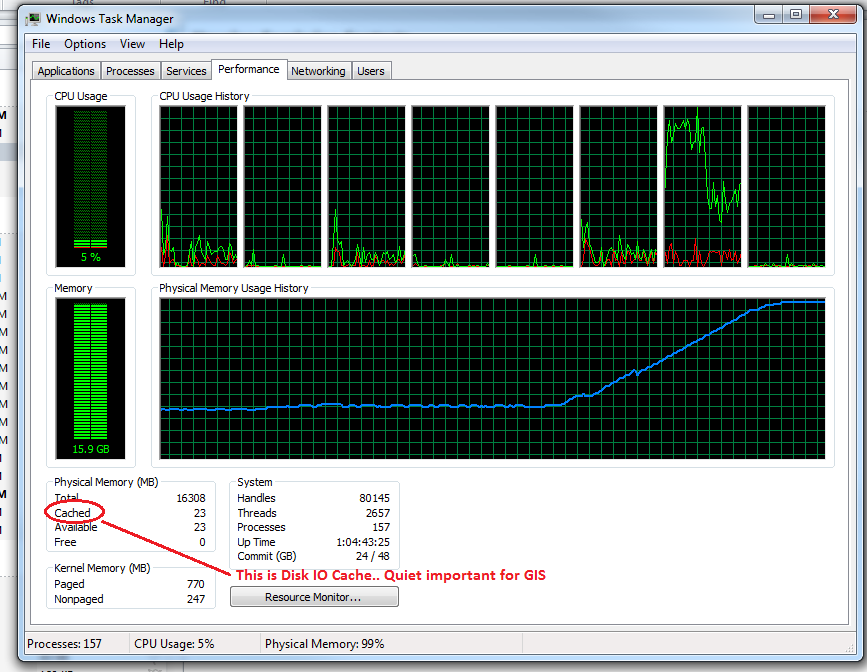


The indexing service in Pro is so bad that my organization is contemplating completely disabling it for all users, not just because of its impacts on individual PCs but also for the impacts on corporate file systems that the indexing service wants to crawl. These suggestions would be a good start, but they need to make the service way more configurable.


Hello @GrahamWood2 ,
Thank you for your feedback.
Significant enhancements were made to the available indexing capabilities to provide more control over how and when indexes are created and updated. Indexing operations are now limited to using 500MB of available memory by default, as documented here: https://pro.arcgis.com/en/pro-app/latest/help/projects/update-the-search-index-for-project-items.htm... When the limit is reached, indexing stops. After a waiting period it will restart and pick up where it left off.
You can index items that are not added to a project: https://pro.arcgis.com/en/pro-app/latest/help/projects/update-the-search-index-for-project-items.htm..., and choose to exclude specific folders and not index content in those locations.
There is greater control over when and how often different indexing operations run: https://pro.arcgis.com/en/pro-app/latest/help/projects/update-the-search-index-for-project-items.htm... And you can choose to manually update indexes on demand instead of scheduling updates: https://pro.arcgis.com/en/pro-app/latest/help/projects/update-the-search-index-for-project-items.htm....
Administrators may be interested in creating search indexes that can be shared with others so searching is available for enterprise geodatabases and network locations that contain shared GIS data, without each user having to build their own index: https://pro.arcgis.com/en/pro-app/latest/help/projects/index-project-items.htm#ESRI_SECTION1_EB6BC43... . Administrators can provide prebuilt indexes to users through the administrator settings framework with a Pro.settingsConfig file: https://pro.arcgis.com/en/pro-app/latest/get-started/catalog-settings.htm#ESRI_SECTION1_7259C68432CE.... This capability has been available since Pro 3.2.
Learn more about how indexing works by reading this blog post about indexing: https://www.esri.com/arcgis-blog/products/arcgis-pro/data-management/take-stock-of-your-search-index .
Given the above improvements, we are closing this idea. Please let us know if you have further suggestions. Thank you.
You must be a registered user to add a comment. If you've already registered, sign in. Otherwise, register and sign in.