- Home
- :
- All Communities
- :
- Products
- :
- ArcGIS Pro
- :
- ArcGIS Pro Ideas
- :
- Find and replace with nothing in Pro attribute tab...
- Subscribe to RSS Feed
- Mark as New
- Mark as Read
- Bookmark
- Printer Friendly Page
Find and replace with nothing in Pro attribute table

- Mark as New
- Bookmark
- Subscribe to RSS Feed
- Permalink
Thank you so much for adding the Find and Replace function to the attribute table in Pro, it's super useful! In ArcMap, we had the ability to find and replace contents of the attribute table with nothing if we wanted to, but that option is not available in Pro currently from what I can tell. Any way to bring this back?
My use case is that I'm removing some unwanted HTML from my attribute table. When I set up the find and replace, the arrow(s) are inactive with no value in the Replace box. As a workaround I've been replacing with a space but it would be better if I could just remove the HTML altogether as I could with ArcMap.
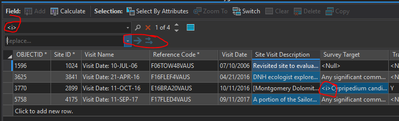
Thanks for your consideration!
- « Previous
-
- 1
- 2
- Next »

Is there an option to search for the empty cells, and replace them with data?
Ex: We try to put 'n/a' when we are out taking data in the field on Field Maps, but sometimes responses are left blank. When turning in a report, we would like to not have blanks, so it can become tedious when having to fill those in one by one.
I realize in hindsight, I could set a default answer, or make the question mandatory on Field Maps.
Thank you.


@GISJess You could use Select by Attributes to select records where the values in a field are null.

With the selection in place, then Calculate Field to populate those values all at once instead of one by one.
@KoryKramer Thank you. The cells I had were completely blank, no <Null>, nada.
So I ended up using Select By Attributes, but set the field 'is equal' to and left the third dropdown blank.
This selected all the records with blanks. Yay.
Then I used the Calculate Field, as you suggested, with this formula:
!Weight_g!.replace(" ","N/A") and it worked. Double yay!
Thanks for your quick response, it helped me solve this issue much faster. 🙂
It would be nice to have the find/replace be able to also find the blanks to make the process faster.
"It would be nice to have the find/replace be able to also find the blanks to make the process faster."
Sneak preview of ArcGIS Pro 3.1, scheduled for February 2023:

You must be a registered user to add a comment. If you've already registered, sign in. Otherwise, register and sign in.