- Home
- :
- All Communities
- :
- Products
- :
- ArcGIS Pro
- :
- ArcGIS Pro Ideas
- :
- Add ArcMap parity to composite locators with multi...
- Subscribe to RSS Feed
- Mark as New
- Mark as Read
- Bookmark
- Printer Friendly Page

- Mark as New
- Bookmark
- Subscribe to RSS Feed
- Permalink
Seeing if there's any larger demand for this capability. Originally this got logged as a bug but was resolved as As Designed. Recently confirmed with Esri support that they are not planning to reach parity with this ArcMap capability.
In ArcGIS Pro, it does not appear possible to create multirole or composite locators that allow you to use different primary fields. The specific use case we had in the ArcMap days was using a composite locator to first attempt to geocode a table using an address field and then falling back on the parcel number if that failed. This was really helpful when geocoding data from non-spatial systems because while the parcel numbers were usually right there could be typos or errors in the address since they were hand typed. Here's an example of a dummy table we might get.
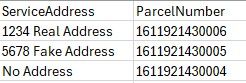
In ArcMap composite locators, you can specify multiple primary fields and determine which locators use which of those fields. So using the data sample above, we'd have the address point locator use the ServiceAddress field to geocode and the parcel locator use the ParcelNumber field.
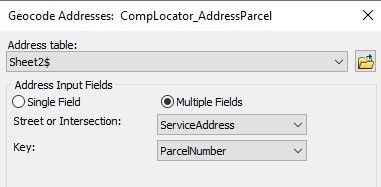
In ArcGIS Pro, whether creating a multirole or composite locator, it does appear this is possible. I'm wondering if this is a problem for other people and if you have any use cases or other scenarios where you need to geocode using multiple address, parcel number, POI, common name, or other such fields?
I should note that I was able to find a workaround by creating a feature locator for the parcel instead and using that in the composite locator. This ends up being clunky though because the locator still defaults to single field, and then when switching to multiple fields it lists all of the address inputs and a generic Name field at the end that is not intuitive to know that's where you should add the parcel ID field.


@JohnNergeBrooklynPark It is possible in Pro to do what you are looking for, it just requires a different workflow in formatting your data. The service address and parcel number should be in the same field in the table and this field should be mapped to the Address field when you geocode the table with your multirole locator that contains PointAddress or StreetAddress role for the street addresses and Parcel role for the parcel numbers.


So that would technically work, but that's not really how our data are stored. That screenshot was meant to make it obvious which addresses are valid or not, but in reality we're geocoding tables with thousands of records, and we won't know before running them which ones will match to an address, street, or parcel ID ahead of time.
Also sometimes the data is in house and other times it's from a third party. So what we really need is that ArcMap style functionality where you can geocode using multiple primary fields so that if one fails the other can still be used further down the composite locator hierarchy.

Would love to see this. I am trying to do a similar thing:
@JohnNergeBrooklynPark @shildebrand , I was able to figure out a different workflow using the Rematch Addresses pane to address geocoding a table formatted like below using either a multirole locator or a composite locator of locators created with the Create Locator tool. In this case the multirole locator would use the PointAddress and Parcel roles.

1. Geocode the table with the multirole locator using SingleField, mapping the ServiceAddress field.
2. Open the Rematch Addresses pane and Select Add or Modify Locator from the Locators drop-down menu.
3. Map the Single Line Input field to the ParcelNumber field. This maybe the IN_ParcelNumber field depending on what Output Field option was chosen when geocoding the table originally.
4. Click the back button to go to the main pane
5. Click the Menu burger button > Predefined Queries > Unmatched Addresses or create a custom query.

6. Click the Auto Rematch button to rematch the selected records.
I appreciate the workaround, but it's not really gonna work for most of our workflows because if we're doing any rematching it would be against our locators, not the world geocoder.
The workaround I mentioned in a previous post still works, I've even been able to use it as a geocoding service in Survey123 for Address input fields to allow for autocomplete on either an address or park name, for example.
@JohnNergeBrooklynPark The workaround I suggested does not involve using the ArcGIS Geocoding service, you would be using your custom locators for rematch in the Rematch Addresses pane. Step 2 allows you to use the existing locator and just map a new field to use for geocoding or you can select a brand new locator for the rematch/review workflow.
There is no way around having extra input address fields when the composite consists of a locator created with the Create Locator tool and the Create Feature Locator tool. If you removed the extra input fields when building the composite locator, the locator would be invalid and not work as expected.
Having more context for how you are using the locator in your workflows helps to better understand your needs and identifying a suitable workaround.
@JohnNergeBrooklynPark @ShanaBritt I was able to successfully script this with python by geocoding a list of customers using the Assessor_ParcelNumber field (APN) and then export out the unmatched features and feed it through a second composite locator consisting of county parcel data and the ESRI World Geocoder and using the address field to geocode. It's a little messy but it works. Essentially, we want the address data to be geocoded by APN first, then address (the reverse of what John was showing in his table). See step 9-13 in the script below:
import arcpy
import os
import sys
import traceback
from datetime import datetime

# --- Set workspace and paths ---

arcpy.env.workspace = r"G:\GIS\00-GIS\3.0 Customer Care\Geocode Testing"  # Change to your workspace

excel_file = r"G:\GIS\00-GIS\3.0 Customer Care\Geocode Testing\SanTan_PremPar_112425.xlsx" #input excel file
sheet_name = "SanTan_PremPar_112425"  #excel worksheet

output_gdb = r"G:\GIS\00-GIS\3.0 Customer Care\Geocode Testing\GeocodeTesting_112425.gdb" #output gdb - best to create new gdb location to store outputs
excel_table = os.path.join(output_gdb, "SanTan_PremPar") #output table created from excel sheet
feature_class = r"G:\GIS\Packages\Geocoder\EPCOR Customers Geocode.gdb\A_W_WW_SanTan_2375" #existing prem par geocoded feature class
join_field_fc = "Premises_Id"       # Field to join on in feature class - shouldn't need to change this
join_field_excel = "Premises_Id"    # Field to join on in Excel table - shouldn't need to change this

locator_apn = r"G:\GIS\00-GIS\3.0 Customer Care\Geocode Testing\Pinal_APN_Locator_Revised.loc" #single field APN locator - change depending on county you are working in
locator_address = r"G:\GIS\00-GIS\3.0 Customer Care\Geocode Testing\Pinal_Composite_Locator.loc" #composite locator that includes address locator created from county parcel data and the ESRI world locator - change depending on county you are working in
apn_field_map = "'Single Line Input' Assessor_ParcelNumber VISIBLE NONE" #Change to the field name that holds the APN
apn_field_to_clean = "Assessor_ParcelNumber"
address_field_map = ("\'Address or Place\' Address_Line_1 VISIBLE NONE;Address2 <None> VISIBLE NONE;Address3 <None> VISIBLE NONE;Neighborhood <None> VISIBLE NONE;City City_Name VISIBLE NONE;County <None> VISIBLE NONE;State State_Province_Code VISIBLE NONE;ZIP ZIP Postal_Code VISIBLE NONE;ZIP4 <None> VISIBLE NONE;Country <None> VISIBLE NONE") #should not need to change this
geocoded_apn = r"G:\GIS\00-GIS\3.0 Customer Care\Geocode Testing\GeocodeTesting_112425.gdb\Geocoded_APN" #output feature class that stores output of running the apn geocoder
geocoded_address = r"G:\GIS\00-GIS\3.0 Customer Care\Geocode Testing\GeocodeTesting_112425.gdb\Geocoded_Address" #output feature class that stores output of running the address composite locator
apn_match = r"G:\GIS\00-GIS\3.0 Customer Care\Geocode Testing\GeocodeTesting_112425.gdb\Geocoded_APN_Match" #output feature class of only matched records from apn geocoder
apn_unmatched = r"G:\GIS\00-GIS\3.0 Customer Care\Geocode Testing\GeocodeTesting_112425.gdb\Geocoded_APN_Unmatched" #output gdb table of unmatched records from apn geocoder - to be fed into composite locator

try:
    # --- Step 1: Convert Excel to Table ---
    if not os.path.exists(excel_file):
        raise FileNotFoundError(f"Excel file not found: {excel_file}")
    arcpy.ExcelToTable_conversion(excel_file, excel_table, sheet_name)
    print("Excel To Table Complete ")

    # --- Step 2: Create a feature layer from the feature class
    if not arcpy.Exists(feature_class):
        raise FileNotFoundError(f"Feature class not found: {feature_class}")
    feature_layer = "featurelayer"
    arcpy.MakeFeatureLayer_management(feature_class, feature_layer)

    # --- Step 3: Create a table view from the join table (if it's not already a table view)
    if not arcpy.Exists(excel_table):
        raise FileNotFoundError(f"Geodatabase table not found: {excel_table}")
    table_view = "tableview"
    arcpy.MakeTableView_management(excel_table, table_view)

    # --- Step 4: Add the join
    arcpy.management.AddJoin(table_view, join_field_excel, feature_layer, join_field_fc)

    # --- Step 5: Select Features That Did Not Join ---
    # These will have NULLs in the joined table field
    joined_field = f"{os.path.basename(feature_class)}.{join_field_fc}" # Z_W_WW_SanTan_Prem_Par_Final.Premises_Id
    print("Joined Field Name: " + joined_field)
    selection = arcpy.SelectLayerByAttribute_management(table_view, "NEW_SELECTION", f"{joined_field} IS NULL")
    count = arcpy.GetCount_management(table_view).getOutput(0)
    print(count + " New Customers Selected")

    # --- Step 6: Remove Join ---
    arcpy.management.RemoveJoin(table_view)
    print("Join Removed")

    # --- Step 7: Export Unmatched Features ---
    output_unmatched = os.path.join(output_gdb, "UnmatchedFeatures")
    arcpy.CopyRows_management(table_view, output_unmatched)
    print("Exported unmatched features to:", output_unmatched)

    # --- Step 8: Remove dashes and spaces from APN field

    # Check if the workspace and table exist
    if not arcpy.Exists(output_unmatched):
        raise FileNotFoundError(f"Table not found: {output_unmatched}")

    # Check if the field exists
    field_names = [f.name for f in arcpy.ListFields(output_unmatched)]
    if apn_field_to_clean not in field_names:
        raise ValueError(f"Field '{apn_field_to_clean}' not found in table '{output_unmatched}'.")

    # Update the field values
    with arcpy.da.UpdateCursor(output_unmatched, [apn_field_to_clean]) as cursor:
        for row in cursor:
            original_value = row[0]
            if original_value:
                cleaned_value = original_value.replace("-", "").replace(" ", "")
                row[0] = cleaned_value
                cursor.updateRow(row)

        print("✅ Dashes and spaces removed successfully.")

    # --- Step 9: Geocode Unmatched Features by APN
    if not arcpy.Exists(locator_apn):
        raise FileNotFoundError(f"APN locator not found: {locator_apn}")
    arcpy.GeocodeAddresses_geocoding(output_unmatched, locator_apn, apn_field_map, geocoded_apn, output_fields="MINIMAL")
    print("APN Geocoding complete.")

    # --- Step 10: Export only matched records (Status = 'M')
    arcpy.Select_analysis(
        in_features=geocoded_apn,
        out_feature_class=apn_match,
        where_clause="Status = 'M'"
    )
    print("Matched results exported to:", apn_match)

    # --- Step 11: Create a layer with unmatched and tied records
    unmatched_layer = "Unmatched_Tied_Layer"
    arcpy.MakeFeatureLayer_management(
        in_features=geocoded_apn,
        out_layer=unmatched_layer,
        where_clause="Status IN ('U', 'T')"
    )

    # Copy rows to a geodatabase table
    arcpy.CopyRows_management(
        in_rows=unmatched_layer,
        out_table=apn_unmatched
    )
    print("Unmatched and tied results exported to: ", apn_unmatched)

    # --- Step 12: Delete unwanted fields from unmatched table
    fields_to_delete = ["Status", "Score", "Match_type", "Match_addr", "Addr_type"]
    arcpy.DeleteField_management(apn_unmatched, fields_to_delete)
    print("Fields deleted successfully.")

    # --- Step 13: Geocode APN Unmatched features with Composite Locator (county parcel addresses & ESRI geocoder)
    if not arcpy.Exists(locator_address):
        raise FileNotFoundError(f"Address locator not found: {locator_address}")
    arcpy.GeocodeAddresses_geocoding(apn_unmatched, locator_address, address_field_map, geocoded_address, output_fields="ALL")
    print("Address Geocoding complete.")

except FileNotFoundError as fnf_error:
    print(f"❌ File error: {fnf_error}")

except ValueError as val_error:
    print(f"❌ Value error: {val_error}")

except arcpy.ExecuteError:
    print("❌ ArcPy error:")
    print(arcpy.GetMessages(2))

except Exception as e:
    print("❌ Unexpected error occurred:")
    traceback.print_exc()
Thanks @ShanaBritt and @shildebrand, I think I've got the info I need for any multiple input fields geocoding we need to do in the future in Pro!
You must be a registered user to add a comment. If you've already registered, sign in. Otherwise, register and sign in.