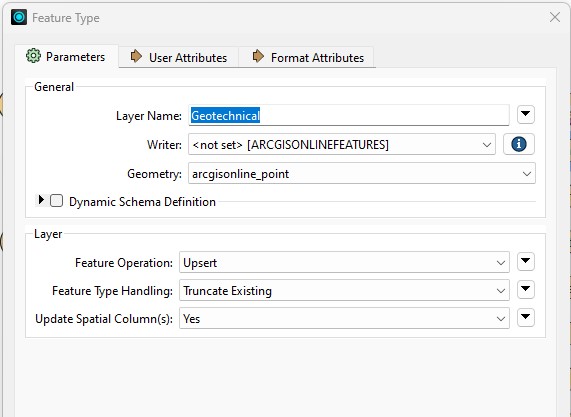
In FME Workbench 2023.1, I'm using the ESRI ArcGIS Online Feature Service Writer to update a layer in AGOL with data from a local fGDB. I have the writer configured as per the screenshot below.
After it runs, the layer in AGOL is visible when zoomed all the way out! (This was not previously the case).
So, then I republish the layer in ArcGIS Pro and it fixes the layer so that it now disappears when zoomed out (I could also do this directly in AGOL).
I then change the FME writer to ‘Use Existing’ (and not ‘Truncate Existing’) and re-run the translation.
This time it works without affecting the AGOL layer visibility.
So I change the FME writer back to ‘Truncate Existing’ (and not ‘Use Existing’) and re-run the translation.
It breaks the AGOL layer visibility again!
I plan to use something like this to update many layers, and I cannot have them all visible when zoomed out. It would be a complete mess.
Am I doing something wrong? How can I update the data (including deleting features) without affecting the AGOL layer’s visibility?
(The issue occurs for both 'Insert' and 'Upsert'. I’m using ‘Truncate Existing’ so that if we delete a feature locally, this will cause it to be deleted on AGOL. Perhaps there is a better way to do this? But that would be another question entirely.)
Solved! Go to Solution.
Huh, it is looking like this is a bug in AGOL. I have just replicated the same behaviour using only ArcGIS Pro.
If (in ArcGIS Pro) I simply run the Truncate tool on the AGOL layer, it resets that layer's visibility to be visible at all zoom scales in AGOL! I then run an Append, to repopulate the data, and it remains visible at all zoom scales. Not good.
I'm going to log this with ESRI support.
Something in the FME Writer configuration is overwriting the service. It recreates the layer. This is what resets the symbology / layer settings. The same would happen in ArcGIS Pro if you published to overwrite an existing layer.
The fme documentation suggests there are additional parameters on using existing or creating services. It also advises caution with using truncate existing in some contexts.
You will need to review the other parameters and documentation so that the service is not overwritten if it exists already.
I'm not 100% convinced that it is overwriting the service because it does not alter the symbology, the labels or the custom (arcade) pop-ups.
(Note that FME cannot send the symbology, labels or pop-ups configuration. It doesn't have access to this. It is only accessing the source data as feature classes from the local database directly and not accessing any layers.)
Here's some other odd behaviour: Although the layer visibility gets reset to display at all zoom-scales, the label visibility remains at the original zoom-scale range as the layer itself originally had. The labels never had any explicit visibility range set - it was just inherited from the layer itself.
The FME writer in this case is not using 'create' or 'overwrite' but is set to 'Use Existing'. Here's what the FME AGOL Feature Service Writer documentation says about 'Truncate Existing':
There is nothing there that suggests it would be overwriting the hosted feature layer. It explicitly says that it would just remove all the features.
Huh, it is looking like this is a bug in AGOL. I have just replicated the same behaviour using only ArcGIS Pro.
If (in ArcGIS Pro) I simply run the Truncate tool on the AGOL layer, it resets that layer's visibility to be visible at all zoom scales in AGOL! I then run an Append, to repopulate the data, and it remains visible at all zoom scales. Not good.
I'm going to log this with ESRI support.
Hi! I'm not using FME but I am having the same problem with the layer in AGO getting the visibility reset after I use Append to AGO hosted feature layer from ArcGIS Pro. Did you get anywhere with Esri support on this?
ESRI created a bug record for this issue: Bugs & Enhancements | My Esri
Note that this may not be the same issue that you've described though. For me (and as per the bug), the issue occurred when truncating the layer in AGOL, not when appending to it.
Thank you, I see it's bug 000171689 from your link. I run a Truncate first on the layer and then I append the layer in AGOL.☹️ I will contact Esri tech support and ask to be added to this bug. Too bad it's been over a year and no movement on it.
Yes, sounds like what I was doing, and the same result. Rather sad that they've not done anything about it for so long.