Hello all,
I recently came across the workflow of uploading a zipped folder as an item to ArcGIS Online and having the ability to upload it as a "Photos with locations" file type, which can also place a point down at the photos' location and attach the photo to the waypoint, similar to the workflow in this blog post https://www.esri.com/about/newsroom/arcwatch/add-geotagged-photos-to-arcgis-online-web-maps.
I have been thinking about building out a web tool to place into an Experience Builder that allows my end users to use this functionality, uploading photos from an UAS for situational awareness purposes. The end goal is to append the data to an existing feature service instead of creating a new one entirely, but we'll deal with that later.
From what I have seen, this workflow will create an Image Collection, then publish that and somehow know to plot points at the exif information. I have been able to upload a small zip folder with a few geotagged UAS images to the files within my Notebooks and create an Image collection from that using "gis.content.add" (script below) however I can't figure out how to get it to actually publish properly. Anyone have any ideas or can point me in the right direction?
Adds the zipped image to my content as an image collection:
zip_path = '/arcgis/home/DJI_0001.zip'

item_props = {
    "title": "Field Photos Image Collection",
    "type": "Image Collection",
    "tags": "photos, image collection, exif",
    "snippet": "Geotagged photos uploaded as an image collection"
}

image_collection = gis.content.add(
    item_properties=item_props,
    data=zip_path,
    file_type="zip"
)
image_collection
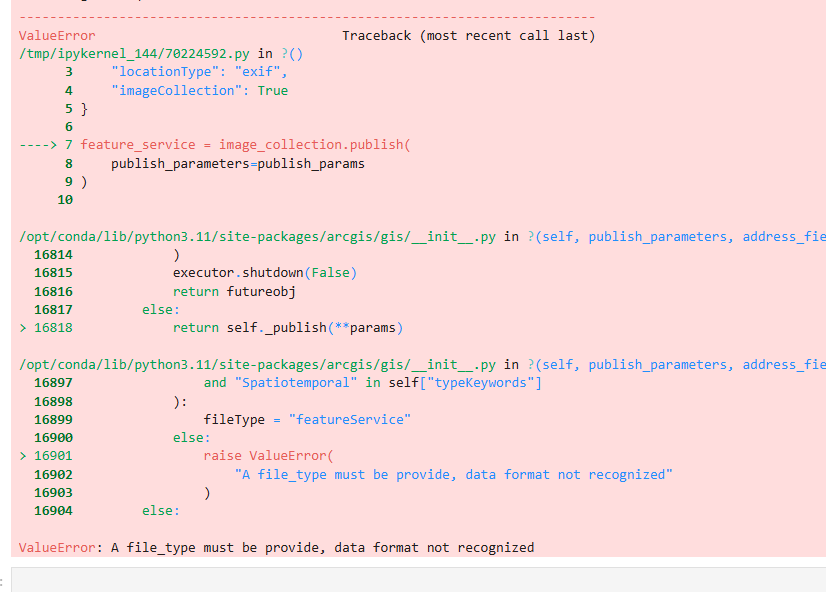
Suppose to publish the Image Collection as a feature service, but returns with the error "A file_type must be provide, data format not recognized"
publish_params = {
    "name": "Field_Photos_Feature_Service",
    "locationType": "exif",
    "imageCollection": True
}
feature_service = image_collection.publish(
    publish_parameters=publish_params
)
feature_service
(This post is also up in the Developers community)


