- Home
- :
- All Communities
- :
- Products
- :
- ArcGIS Maritime
- :
- ArcGIS Maritime Questions
- :
- Digital Shoreline Analysis System - Error
- Subscribe to RSS Feed
- Mark Topic as New
- Mark Topic as Read
- Float this Topic for Current User
- Bookmark
- Subscribe
- Mute
- Printer Friendly Page
Digital Shoreline Analysis System - Error

- Mark as New
- Bookmark
- Subscribe
- Mute
- Subscribe to RSS Feed
- Permalink
Hello I am working with digital Shoreline Analysis System software developed by usgs for coastal zone analysis. When I try to generate the statistics, I get the following error message: Shoreline layer "all-coastlines" has some record (s) that do not have a valid date specified in date field "date_". - I check: the date setting of my Date_ filed (MM/DD/YYYY), the dates are in this same format in my "all-coasltines" file too. - I tried to remove the "0" before the figure of the month (4/03/1989 instead of 04/03/1989) but no success.- The field "date_" is in text format, with 10 characters. I also tried different options with 22 length by adding times but no success. 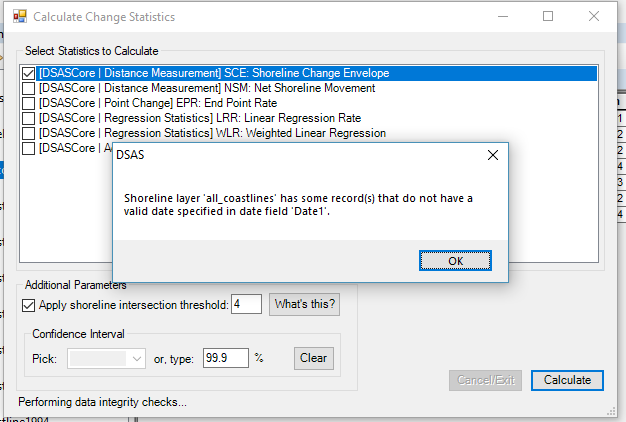
Has anyone come across this problem?

- Mark as New
- Bookmark
- Subscribe
- Mute
- Subscribe to RSS Feed
- Permalink
I had the same problem, and I solved it by working on preprocessing. My steps were:
Digitalize the shorelines (with a fixed zoom scale) and create one baseline in the continental part, you may have to create in both continental and water parts (depending on our region). It is necessary to use shapefiles in the same coordinate system, and it must be based on meters (UTM).
I used the ArcGIS 10.8 and DSAS v5.
In the case of your shorelines had been digitalized in different shapefiles, use the "Merge" tool to join all shorelines in one shapefile.
In ArcCatalog, click with the right bottom in the folder you want to put your geodatabase, so go to "New" and in "Personal Geodatabase". After that, with a double click in the archive just created, click with the right bottom in the space of it, and go to "Import" to put there two shapefiles, one with your shorelines and other with the baseline(s).
Some classes and its types are needed, so you should revise if your shapefiles has:
- Baseline:
--> Created by the user: id (Long Integer)
--> Created by the DSAS through Attribute Automator: SHAPE_Length (Double), DSAS_ID (Long Integer)
- Shoreline:
--> Created by the user: id (Long Integer), Uncy (Double), Date_ (Text).
--> Created by the DSAS through Attribute Automator: DSAS_date (text), DSAS_uncy (Double), DSAS_type (text)
I let the uncertainty(Uncy) camp empty, and the DSAS use 10 meters as default in this case. After that, I used the video of DSAS (https://www.usgs.gov/media/videos/introduction-dsas-v50-sample-data-workflow) as guide.

- Mark as New
- Bookmark
- Subscribe
- Mute
- Subscribe to RSS Feed
- Permalink
First, you need to check the log in the given file path, scroll at the end of the log and look for error messages. A pretty common/silly one is the date format in the Date Attribute. Please look at @Katherine_Ames 's answer above (and my reply for specifics) for more details on that matter.

- « Previous
-
- 1
- 2
- Next »
- « Previous
-
- 1
- 2
- Next »