Turn on suggestions
Auto-suggest helps you quickly narrow down your search results by suggesting possible matches as you type.
Cancel
- Home
- :
- All Communities
- :
- Developers
- :
- JavaScript Maps SDK
- :
- JavaScript Maps SDK Questions
- :
- Styling of JS API Legend
Options
- Subscribe to RSS Feed
- Mark Topic as New
- Mark Topic as Read
- Float this Topic for Current User
- Bookmark
- Subscribe
- Mute
- Printer Friendly Page
Styling of JS API Legend
Subscribe
8448
8
12-06-2010 06:05 AM

12-06-2010
06:05 AM
- Mark as New
- Bookmark
- Subscribe
- Mute
- Subscribe to RSS Feed
- Permalink
Hey all,
I'm working with the AGS JS API legend dijit (its awesome!).
Has anyone successfully styled this so as to change the size of the symbol swatches (e.g. squares representing polygon features), font-family, and font-size? I'm simply trying to 'harmonize' the style of the legend dijit presentation with my site.
Thanks!
I'm working with the AGS JS API legend dijit (its awesome!).
Has anyone successfully styled this so as to change the size of the symbol swatches (e.g. squares representing polygon features), font-family, and font-size? I'm simply trying to 'harmonize' the style of the legend dijit presentation with my site.
Thanks!
8 Replies


12-06-2010
07:44 AM
- Mark as New
- Bookmark
- Subscribe
- Mute
- Subscribe to RSS Feed
- Permalink
There are several css classes for the legend dijit that allow you to alter the default appearance, here's an example where the font color and family are modified for the text in the legend:
The API Reference for the JavaScript API has a listing of the CSS classes.
      .esriLegendLayerLabel{
        font-family:'Monotype Corsiva';
        color:red;
      }
      .esriLegendServiceLabel{
        font-family: 'Times New Roman';
        color:green;
      }
      .esriLegendService{
        color:orange;
        font-weight:bold;
      }
The API Reference for the JavaScript API has a listing of the CSS classes.

05-24-2024
02:58 PM
- Mark as New
- Bookmark
- Subscribe
- Mute
- Subscribe to RSS Feed
- Permalink
Hi Kelly. I would like to adjust the size of the legend. Can you help me?. This is my css:
12-06-2010
09:50 AM
- Mark as New
- Bookmark
- Subscribe
- Mute
- Subscribe to RSS Feed
- Permalink
You can increase the size of the symbol swatches using something like this:
      .esriLegendService img{
        width:55px;
      }


01-26-2011
01:03 PM
- Mark as New
- Bookmark
- Subscribe
- Mute
- Subscribe to RSS Feed
- Permalink
Anyone know how to use this with the Javascript AGS api? Specifically. We create a legend at startup with:
legend = new esri.dijit.Legend({map:map},"legendDiv");
legend.startup();
and in the body of the document we have
<div id="legendDiv" dojoType="dijit.layout.ContentPane" name="my map" style="overflow:auto;width:178px;height:250px;vertical-align:top;"></div>
The discussion implies I can use CSS Styles to change the default name displayed by the dijit.Legend by modifying esriLegendServiceLabel. Where is this done and how does the digit know about it?
legend = new esri.dijit.Legend({map:map},"legendDiv");
legend.startup();
and in the body of the document we have
<div id="legendDiv" dojoType="dijit.layout.ContentPane" name="my map" style="overflow:auto;width:178px;height:250px;vertical-align:top;"></div>
The discussion implies I can use CSS Styles to change the default name displayed by the dijit.Legend by modifying esriLegendServiceLabel. Where is this done and how does the digit know about it?

02-27-2012
09:19 PM
- Mark as New
- Bookmark
- Subscribe
- Mute
- Subscribe to RSS Feed
- Permalink
Has anyone found the answer to this question?

02-27-2012
10:12 PM
- Mark as New
- Bookmark
- Subscribe
- Mute
- Subscribe to RSS Feed
- Permalink
AFAIK, you can only change the style of the legend elements like service label, layer label, image size, etc as set out in the API. The "name" of the legend? I presume you mean the service label. This is determined by the name of the map service(s) in the legend dijit definition. You can set the name of the service using layerInfos.

08-14-2015
09:10 AM
- Mark as New
- Bookmark
- Subscribe
- Mute
- Subscribe to RSS Feed
- Permalink
Do you know if any of this has changed since the last post -- over 3 years ago?
Also, is the Legend title, etc, controlled by the type of renderer that is used to represent the feature layer?
For example, in this instance, a unique value renderer is used and there is no sub-header in the Legend.
However, when I use a classbreaksrenderer, the field used to calculate the breaks is shown below the Legend header (see below).
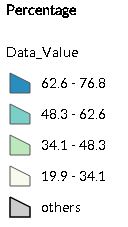
Finally, is it possible to reverse/dictate the order of the Legend items?
Thanks...Chris
08-26-2015
04:20 AM
- Mark as New
- Bookmark
- Subscribe
- Mute
- Subscribe to RSS Feed
- Permalink
FYI...I was able to hide the "Data_Value" using CSS and reverse the Legend items.
Thanks...Chris
