I'm trying to get an ArcGIS Layer List component to work with a mapImageLayer where each sublayer can display its own legend instead of having the legend only appear at the top level. The map service has up to 4 sublayers. The closest I got is to get the legend to appear for the top level.
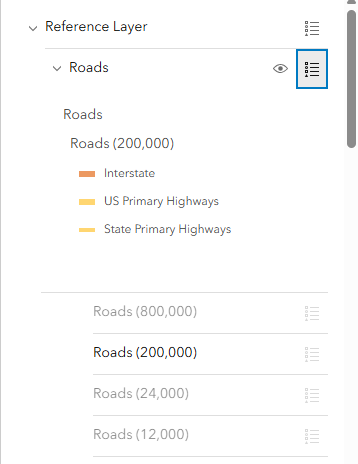
As you can see, the sublayer's legend buttons are grayed out.
This is the code I used:
Hi @MichaelWen_Timmons ,
Is the MapImageLayer you’re working with public? That would make troubleshooting much easier. When layers appear greyed out in the LayerList, it usually means they’re outside the visible scale range—could that be the case here?
This first CodePen example uses a different MapImageLayer, but the legends for each sublayer are visible. I added a conditional statement to remove the list item panel from the main MapImageLayer so that only sublayers are included, if that’s the behavior you want:
https://codepen.io/sagewall/pen/MYeyppY
Since the LayerList hasn’t been refactored into a native web component in version 4.34, you’ll likely see a deprecation message about the Legend widget. This should be resolved in version 5.0, where the refactored LayerList component will use the Legend component.
This second CodePen creates a Legend component in the listItemCreated function. This approach avoids the deprecation warning and overrides the default behavior of hiding legends for layers that aren’t visible by setting the ignoreLayerVisibility property to true. You’ll also need to define the layerInfos property for the legend in each list item panel to show only the sublayer for that item, along with a few other properties to wire everything together:
https://codepen.io/sagewall/pen/YPWqNdV
Without seeing the properties of your layer, it’s hard to pinpoint the root cause of the missing sublayer legends. If the issue is due to visible scale ranges, setting ignoreLayerVisibility to true on the Legend should override the default behavior and display the legends in the LayerList item panels.

