Select to view content in your preferred language

GeoEvent: Administrative Reset Tool

6710
3
03-06-2020 11:00 AM
EricIronside
Esri Regular Contributor
11 3 6,710

Updated 10/26/2021

Doing a lot of testing with GeoEvent allows me the opportunity to do a lot of administrative resets [as described by RJ Sunderman‌ in his blog How to Administratively Reset GeoEvent Server ].  Since I'm doing this frequently, I wrote a new administrative tool to do the reset for me automatically.  This tool follows the same sort of pattern as the ArcGIS Server tools found in <server install>/tools/ directory.

10/26/2021 UPDATES

  • Added ability to delete the three Kafka topic log directories (log, log1, log2) for versions 10.8.1+.
  • Added a RemoveCache.bat tool that will only delete the cached data under the c:/Program Files/ArcGIS/Server/geoevent/data/ folder.

Caveats

  • It only works on Windows at the moment (I do have plans to migrate to Linux eventually).
  • It works against 10.6 or later.
  • It is probably best to always stop the GeoEvent and Gateway Windows services before running the .bat file.


Instructions

1. Download the .zip file and extract the contents onto the GeoEvent Server machine.

+ I put mine in a new folder C:\Program Files\ArcGIS\Server\GeoEvent\tools\

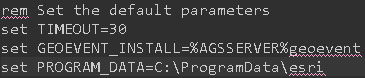
2. Edit the AdministrativeReset.bat  if you need to change the default folder location(s) or timeout parameter:
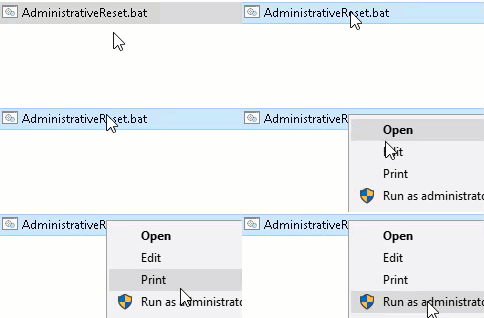
3. Run the AdministrativeReset.bat file as an Administrator.  


The AdministrativeReset tool will do the following:

1. Stop the GeoEvent Server and GeoEvent Gateway Windows services.

2. Delete the contents of the following directories (at 10.9+ it will also delete the additional Kafka \logs1 and \logs2 directories):

3. Delete the gateway configuration file: 

4. Start the GeoEvent Gateway and GeoEvent Server Windows services.

5. A log file will be written out to disk.

Tags (1)
3 Comments
WalterSimonazzi_VicPol
Regular Contributor

Hi @EricIronside @RJSunderman 

That tool is very useful for us, thank you, althought we shouldn't be doing this if the Geoevent were stable enough.

We found that same behaviour of Geoevent 10.9.1 and it's very annoying. We have an isolated machine with only Geoevent 10.9.1 installed receiving a realtime feed at at rate of 25 events/s. We have only 2 Geoevent services running on that machine with two stream services as outputs. Extremly simple setup.
It works but it keeps stopping randomly. We were unable to find any root case, it simply happens.
We are monitoring that machine very closely including with ArcGIS Monitor and found a very strange behaviour. For no apparent reason, the Java Virtual Machine starts to build up and end up taking 100% of the CPU. Sometimes Geoevent recover itself, but many times the two geoevent services on that machine stop working and sometimes the Geopevent Service becames unavailable and we are not even able to connect to the Geoevent management console.
Look at the graphs below:

Num. of transation past week.

WalterSimonazzi_VicPol_0-1652662254436.png

Num of transactions past month.

WalterSimonazzi_VicPol_1-1652662291305.png

Geoevent is constanly building up and falling down for no aparent reason.

Could it be that the number of users connecting to the stream service are not being handled properly by Geoevent (like not unsubscribing users properly in the background) and this makes the Geoevent to consume more and more resources until it crashes?

Can you offer any explanation of why this is happening?


Stephanie_A
Esri Contributor

Hello @EricIronside Do you know if there is a newer version of this tool that does not contain the log4j-1.2.17.jar version? I believe this is one of the vulnerable log4j versions. Thank you! 

DavidWittmann
Regular Contributor

@EricIronside +1 on Stephanie's concern about the log4j 1 vulnerability.

About the Author
Esri Professional Services Real-Time GIS Team GeoEvent Sr. Product Enginner
