Select to view content in your preferred language

Display download datestamps below offline map areas in Field Maps

261
5
3 weeks ago
Status: Open
LindsayRaabe_FPCWA
MVP Regular Contributor

When downloading offline areas in Field Maps, it would be useful to see how long an offline area has been on the device. Over time, areas can become more unstable and users may want to remove and download new copies to recieve changes made to the map since it was downloaded. 

IDEA: Include a datestamp value showing when the offline area was created/downloaded in addition to when it was last sync'd. 
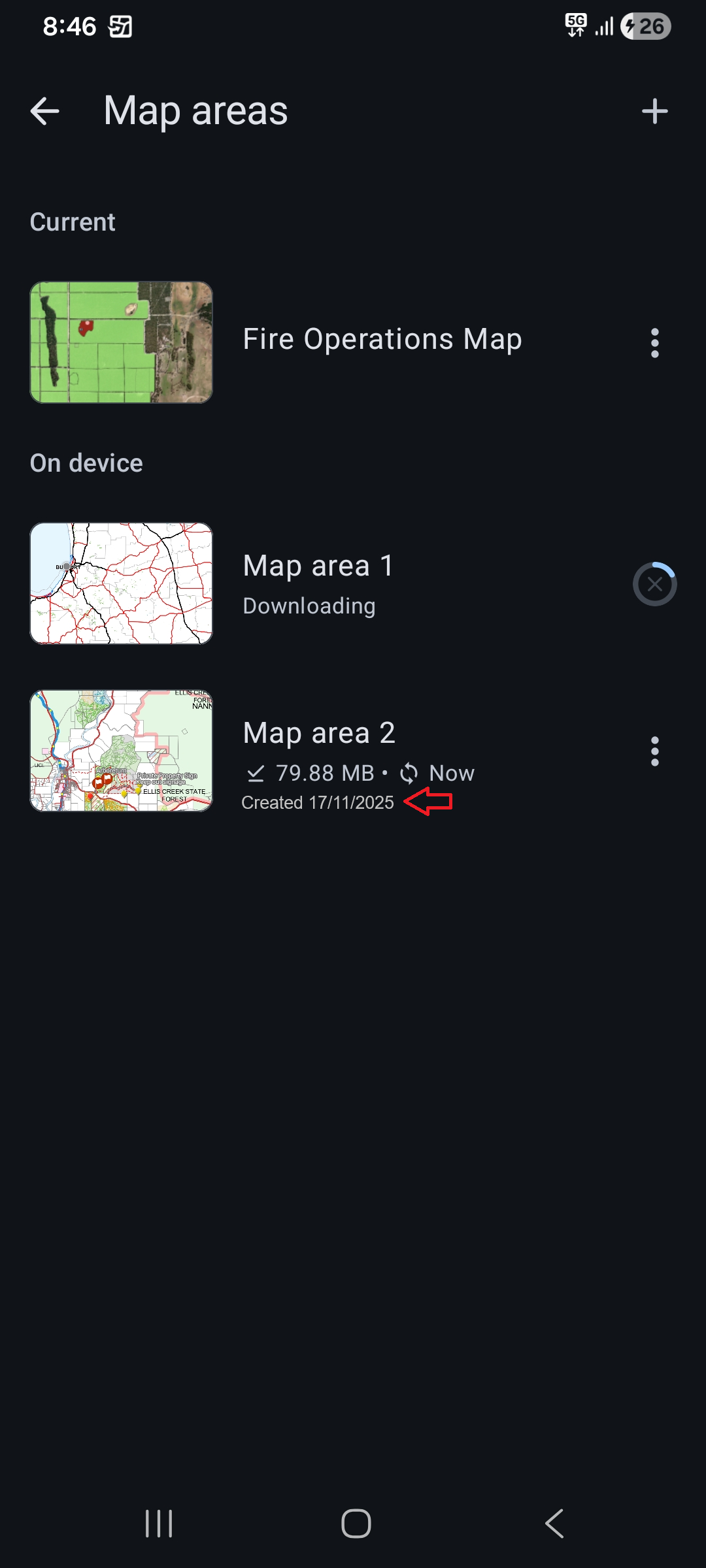
LindsayRaabe_FPCWA_1-1763340764190.png


5 Comments
MitchellGrafstein

Thank you for posting this.

I agree that this should be the bare minimum for managing offline areas from a user's perspective. 

Managing these from an admin's perspective is practically impossible.  I have been afraid to delete "old" replicas because I am unsure of what the behavior will be on the device itself and there is no way of knowing if the device has offline data that still should be synced. 

I should probably just test that with my own ad hoc area for device behavior, but I am curious how folks manage ad hoc/user-generated offline areas and their associated replicas in general. The replicas can quickly number in the thousands.  There is also always the chance of losing data when deleting replicas, even if you set logical criteria based on when a replica was created and last synced. (You could manually try to pull the data off the device, but having done that when there is no replica - therefore, no easy sync - it is not a fun process.)

Even if an org only has 100 users, troubleshooting one offline area on one device is probably not something an admin would like to do, especially if there are a number of maps to manage.

Hope this adds to the discussion; not trying to hijack the idea. 


LindsayRaabe_FPCWA

@MitchellGrafstein yeah, all our offline areas are user defined. We have too much variation and overlap between users and their areas of interest, so don't have any predefined offline areas. It's always a bit nerve wracking to make changes to things and wondering if it's going to impact peoples offline areas. I've got a pretty good understanding now of what will flow through to end users offline maps and what won't. 

MitchellGrafstein

Your idea is a great start at assisting the user in understanding when their offline area was created. 

Even user-defined offline areas create replicas on AGOL or Enterprise which the local mobile geodatabases (SQLite databases) sync with one-to-one.  These replicas take up storage in Enterprise and AGOL, and also, these replicas must exist in order for the user to sync. 

From an administrator's perspective, we have the information when an associated replica with a feature service was created and last synced, but we will never know when a user deletes their offline area or even what map they used to create it in the first place (although I am not sure if this is stored in the mobile geodatabase.) 

Without drilling into the underlying local device files and having a user sending us the mobile geodatabase, we would not be able to tell which replica is associated with the underlying local mobile geodatabase.  

Your idea is great, because it gives us the first piece of information that we can use to discuss an offline area with a user if troubleshooting is ever needed.  I believe this idea is the first step in a long list of steps to better understand and manage user-generated offline areas and their associated replicas from the admin or mobile support side of the equation.  

Personally, it would be nice to know at the map level (in AGOL or Portal) what areas are "out there", when the areas were created, when they were last synced, and by whom.  Even better, this new item that doesn't exist would also be associated with all of its replicas across services in the map, so we could better understand usage and other details.  Even better than that, we can force a remote sync.  Finally, we could confirm sync and delete the replicas and/or flag an offline area on a device that is "stale."

If all that is impossible, it would be nice to just have the replicas deleted when a user delete their local offline area. EDIT - A user-initiated removal of an offline area does delete its replica in AGOL and in Enterprise 11.3 which I just tested. I am unsure if this functionality always existed considering the thousands of replicas we have in some of my services.  Further commentary in my next post.  

Apologies for the semi-rant.  I am 100% behind your idea; I just think it is the first step towards better management of user-defined offline areas.  


LindsayRaabe_FPCWA

100% agree that a way to match replicas to offline areas is needed, and that admin visibility of all offline areas (user generated or otherwise) is also very valuable. You've just confirmed something I suspected too in that when an offline area is removed, replicas are NOT removed from AGOL, continuing to consume storage credits. I don't understand why this is the case. If an offline area is removed from the device, surely there should be some way for Field Maps to update AGOL and tell it to remove the replica. 

MitchellGrafstein

100% agree that a way to match replicas to offline areas is needed, and that admin visibility of all offline areas (user generated or otherwise) is also very valuable. You've just confirmed something I suspected too in that when an offline area is removed, replicas are NOT removed from AGOL, continuing to consume storage credits. I don't understand why this is the case. If an offline area is removed from the device, surely there should be some way for Field Maps to update AGOL and tell it to remove the replica. 

@LindsayRaabe_FPCWA  - I stand corrected, as there must have been some lag when I last checked this yesterday, but the user-generated replicas are now being removed when I remove an offline area from a device.  This is very good news. I am not sure if this was always the case or if this was an enhancement to Field Maps at some point.  

Unfortunately, this is still user-initiated - without a cleanup script (with the chance for lost data) or some other mechanism, we are still short-handed in managing user-generated offline areas.  I assume that if we delete a replica directly that it will not delete the user-generated offline area, either.

I just checked one of our services in Enterprise (11.3) and we have 1807 replicas in the one service alone.  I think I may need to finally spend the time to script out finding replicas by service - when they were created, last synced, and owner reports of some type.