- Home
- :
- All Communities
- :
- Products
- :
- ArcGIS Experience Builder
- :
- ArcGIS Experience Builder Questions
- :
- Sort order in Filter Widget
- Subscribe to RSS Feed
- Mark Topic as New
- Mark Topic as Read
- Float this Topic for Current User
- Bookmark
- Subscribe
- Mute
- Printer Friendly Page
Sort order in Filter Widget


- Mark as New
- Bookmark
- Subscribe
- Mute
- Subscribe to RSS Feed
- Permalink
- Report Inappropriate Content
Is there a way to change the sort order in the filter widget, especially to Natural Sort?
I have set up an expression using the unique values option. Nice as it gives me the list of values to filter on, but they are sorted alphabetically, and I need a natural sort option.
Really confusing the the user when things are way farther down the list than expecting.
W1 and W2 should come before 10, and so on.
| Looks like this | Want to look like this |
| W10-1 | W1-1 |
| W11-1 | W2-4 |
| W1-1 | W10-1 |
| W2-4 | W11-1 |

- Mark as New
- Bookmark
- Subscribe
- Mute
- Subscribe to RSS Feed
- Permalink
- Report Inappropriate Content
Hello,
I was trying to migrate a dashboard to EB for the sole reason of the filter option being able to have more flexibility in the statements. I need a filter that will select values from within a list so it was suggested to use EB.
Similar to other posts here, I am finding the sort options not great. For instance, I would like to be able to filter the data by year and so I'm using all unique values. However I would like it to open with the most recent year as the default value. I tried creating a view with year values sorted descending but the filter still shows the years ascending. I also don't see an option to have the last year be the default. Is this possible?
The frustrating thing is the dashboard selectors allow default values with first and last and apparently more functionality than the filter widget EB. However the dashboard selectors only have equal/does not equal for options hence the reason I'm trying to now use EB. Now I'm struggling with sort and default values in the EB filter. Hopefully I'm just overlooking settings.
Thanks!,
Kathy

- Mark as New
- Bookmark
- Subscribe
- Mute
- Subscribe to RSS Feed
- Permalink
- Report Inappropriate Content

- Mark as New
- Bookmark
- Subscribe
- Mute
- Subscribe to RSS Feed
- Permalink
- Report Inappropriate Content
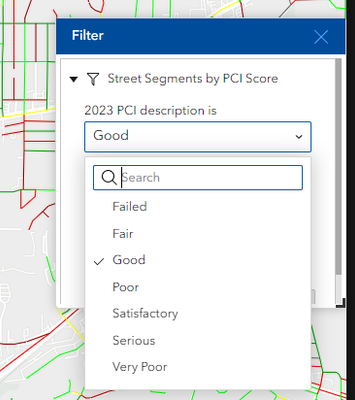
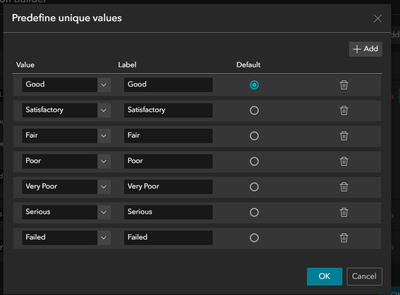
Super unfortunate this is a thing. We need control over the sorting order, can't just be alphabetical.


- Mark as New
- Bookmark
- Subscribe
- Mute
- Subscribe to RSS Feed
- Permalink
- Report Inappropriate Content
Please consider upvoting the Idea to add this functionality to Experience Builder. Filter Widget | Option to display order of predefi... - Esri Community

- « Previous
-
- 1
- 2
- Next »
- « Previous
-
- 1
- 2
- Next »