- Home
- :
- All Communities
- :
- Products
- :
- ArcGIS Experience Builder
- :
- ArcGIS Experience Builder Questions
- :
- Experience builder - Gauge chart
- Subscribe to RSS Feed
- Mark Topic as New
- Mark Topic as Read
- Float this Topic for Current User
- Bookmark
- Printer Friendly Page
Experience builder - Gauge chart

- Mark as New
- Bookmark
- Subscribe to RSS Feed
- Permalink
we are planning to build a dashboard using the ArcGIS experience builder. but we aren't able to find how to create a gauge.
kindly anyone has information on how can reach our target?

- Mark as New
- Bookmark
- Subscribe to RSS Feed
- Permalink
Was this ever fixed? Is there still no way to label a gauge chart?

- Mark as New
- Bookmark
- Subscribe to RSS Feed
- Permalink
Hi can you share this guage logic code or any wr fo8nd pls give as soon as possbile its urgent requiement


- Mark as New
- Bookmark
- Subscribe to RSS Feed
- Permalink
@vinayvamshikrishna what do you mean logic code? If you download developer edition, you should be able to see the Chart widget code.
- Mark as New
- Bookmark
- Subscribe to RSS Feed
- Permalink
can you tell me where can i find it exactly? because I'm trying to modify via coding it or create new custom widgets
Thank you
- Mark as New
- Bookmark
- Subscribe to RSS Feed
- Permalink
You can find the code at directory: ./client/dist/widgets.
Chart widget is in "Common" - "Chart" folder
- Mark as New
- Bookmark
- Subscribe to RSS Feed
- Permalink
I'm trying to add "GW" notation. there's any documentation explain how to modify the gauge?
- Mark as New
- Bookmark
- Subscribe to RSS Feed
- Permalink
@GhaidaAlswayed Where do you want to add the notation? Do you mean change the notation of the displayed value? You can change the notation at value format
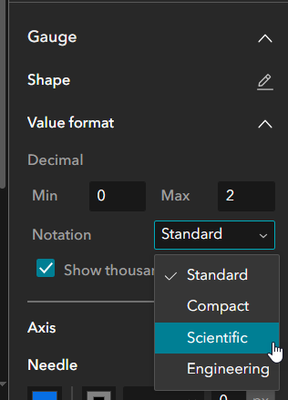
For other note, so far Gauge does not support adding title or description. But you can use Text widget on top of the chart to add any note.

- Mark as New
- Bookmark
- Subscribe to RSS Feed
- Permalink
An odd thing, if you add another gauge widget on top of a guage widget it displays the Title

- « Previous
-
- 1
- 2
- Next »
- « Previous
-
- 1
- 2
- Next »