- Home
- :
- All Communities
- :
- User Groups
- :
- ArcGIS Desktop Installation Support
- :
- Questions
- :
- ArcGIS Desktop 10.8 will not recognize Microsoft R...
- Subscribe to RSS Feed
- Mark Topic as New
- Mark Topic as Read
- Float this Topic for Current User
- Bookmark
- Subscribe
- Mute
- Printer Friendly Page
ArcGIS Desktop 10.8 will not recognize Microsoft Redistributables already installed on my PC

- Mark as New
- Bookmark
- Subscribe
- Mute
- Subscribe to RSS Feed
- Permalink
Unable to install ArcGIS Desktop 10.8 on a PC.
Always get the following error:
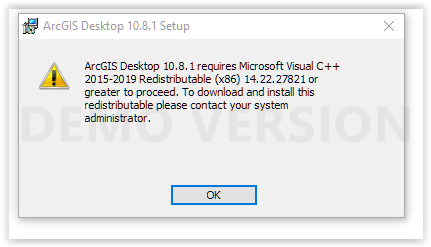
My system has the most current versions (14.26) installed for both x86 & x64.
I have done everything I can think of to no avail:
-repair files
-uninstall & install files
-windows repair (sfc)
-uninstall all previous versions
-deregistered & reregistered the files
All previous versions of ArcGIS have been removed from the computer.
Windows registry shows that the most recent version (14.26) is installed on my PC.
Any suggestions are greatly appreciated. Can I trick ArcGIS during the install into thinking that the correct files are present (when they in actuality are)?

- Mark as New
- Bookmark
- Subscribe
- Mute
- Subscribe to RSS Feed
- Permalink
After 4 hours of research I have solved this issue with ChatGPT help.
Problem:
ArcGIS 10.8 requires older MSI-based Visual C++ runtimes (2013 and 2015–2019).
Most modern systems have only the 2022 runtimes installed.
This version mismatch causes setup errors like return value 0 or 1603.
Step 1: Check Installed Visual C++ Versions
Open PowerShell as Administrator.
Run the command:
winget list "Microsoft Visual C++"
This will list all installed VC runtimes, even if you already removed some via Control Panel.
Example output:
Name Version Source
Microsoft Visual C++ 2013 x64 Redistributable 12.0.30501.0 winget
Microsoft Visual C++ 2015–2019 x64 Redistributable 14.22.27821.0 winget
Microsoft Visual C++ 2022 x64 Minimum Runtime 14.44.35211 winget
Step 2: Uninstall All Remaining VC Runtimes
Share the list from winget with ChatGPT (or manually check which versions are still installed).
Use the following command structure to uninstall any version:
winget uninstall --id <PackageId>
Example:
winget uninstall --id Microsoft.VCRedist.2013.x64
winget uninstall --id Microsoft.VCRedist.2013.x86
winget uninstall --id Microsoft.VCRedist.2015+.x64
winget uninstall --id Microsoft.VCRedist.2015+.x86
:warning: Make sure all 2022 versions are removed if they are interfering with older runtimes.
Step 3: Install Required VC Runtimes
Download and install Microsoft Visual C++ 2013, 2015–2019 redistributables from the official Microsoft site:
2013 x86/x64
2015–2019 x86/x64
Install both Minimum and Additional runtimes if available.
Step 4: Re-run ArcGIS 10.8 Setup
After uninstalling 2022 runtimes and installing required ones, start the ArcGIS 10.8 setup again.
It should now complete without MSI errors.
