- Home
- :
- All Communities
- :
- Products
- :
- ArcGIS Dashboards
- :
- ArcGIS Dashboards Questions
- :
- Re: Using Arcade to change Datetime from UTC to CS...
- Subscribe to RSS Feed
- Mark Topic as New
- Mark Topic as Read
- Float this Topic for Current User
- Bookmark
- Subscribe
- Mute
- Printer Friendly Page
Using Arcade to change Datetime from UTC to CST in Dashboard

- Mark as New
- Bookmark
- Subscribe
- Mute
- Subscribe to RSS Feed
- Permalink
We have a data stream that is displaying times in GMT. We would like to changed multiple to CST (-6 hours).
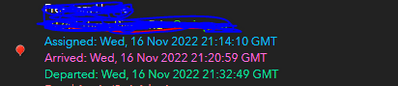
I see the Date functions in Arcade might work.
https://developers.arcgis.com/arcade/function-reference/date_functions/#tolocal
DateAdd shows this
var startDate = Date($feature.dateField);
var oneWeekLater = DateAdd(startDate, 7, 'days');
return oneWeekLater;
Can I change that to
var startDate = Date($feature.dateField);
var Sixhoursago = DateAdd(startDate, -6, 'hours');
return Sixhoursago;
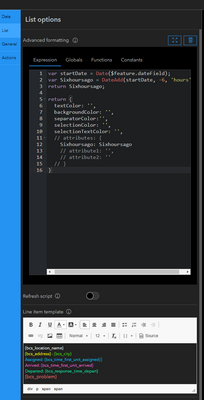
I want to change all these fields.
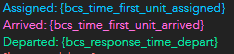


- Mark as New
- Bookmark
- Subscribe
- Mute
- Subscribe to RSS Feed
- Permalink
Yes, date functions would be the way to go. Since you're doing this multiple times, you may also want to use a custom function.
function GMTtoCST(d){
    return DateAdd(d, -6, 'hours')
}

var d1 = Now()
var d2 = Date('2022', '5', '27', '15')
var d3 = Date('2017', '8', '11', '8')

Console(d1, GMTtoCST(d1))
Console(d2, GMTtoCST(d2))
Console(d3, GMTtoCST(d3))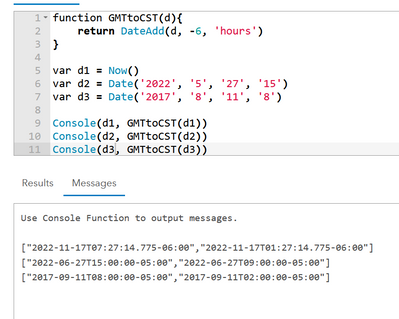
Kendall County GIS
- Mark as New
- Bookmark
- Subscribe
- Mute
- Subscribe to RSS Feed
- Permalink
Thank You Josh!
This is a big help. I need a bit more help with it since I'm not to familiar with Arcade.
Do I replace d1-d3 with
{bcs_time_first_unit_assigned}
{bcs_time_first_unit_arrived}
{bcs_response_time_depart}?
How would I call the function in the line item template to have just CST show?
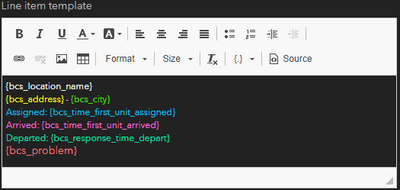
Thank you so much again Josh!
- Mark as New
- Bookmark
- Subscribe
- Mute
- Subscribe to RSS Feed
- Permalink
Up in the Advanced Formatting area, you'd add these converted times to the attributes section, like this:
function GMTtoCST(d){
    return DateAdd(d, -6, 'hours')
}

return {
    attributes: {
        assigned: GMTtoCST($feature.bcs_time_first_unit_assigned),
        arrived:  GMTtoCST($feature.bcs_time_first_unit_arrived),
        departed: GMTtoCST($feature.bcs_response_time_depart)
    }
}
Then in your line item template, you pull out individual attributes like {expression/assigned} and so on.
Kendall County GIS

- Mark as New
- Bookmark
- Subscribe
- Mute
- Subscribe to RSS Feed
- Permalink
I've created an application that shows snow plow clearing in my city. It's supposed to show when a street was last plowed (under 4hrs ago, 4-8 hrs ago, 8-16 hrs ago, 16-24hrs ago). There is a 5hr delay between the timestamp field an my local time zone (EST) so the app isn't showing the data correctly. How can I use arcade to correct this?
Here's an example of my expression for the 16-24 hour time frame:
if (DateDiff ( now() ,  Date($feature.Time_Stamp) , 'hours' ) > 16 && DateDiff ( now() ,  Date($feature.Time_Stamp) , 'hours' ) <= 24 ){
    return "16-24 Hours"}
else {return "No Data"}
