I'm following this steps within Power Automate to ArcGIS Online to set up email notifications on the Citizen Reporter Solution and I'm running into 2 issues.
If I follow the steps exactly as outlined the flow completes and an email notification is sent out. However, I need to go to different emails based on one of the field values. So if the field Department = x then it needs to go to x email and if department=y then it needs to go to y email and if Department = z then it needs to go to z email.
I have tried to add multiple conditions on a parallel branch at step 37 of the above instructions and it fails on the Apply to Each 1 saying there was no input. I then tried a Switch and got the same result.
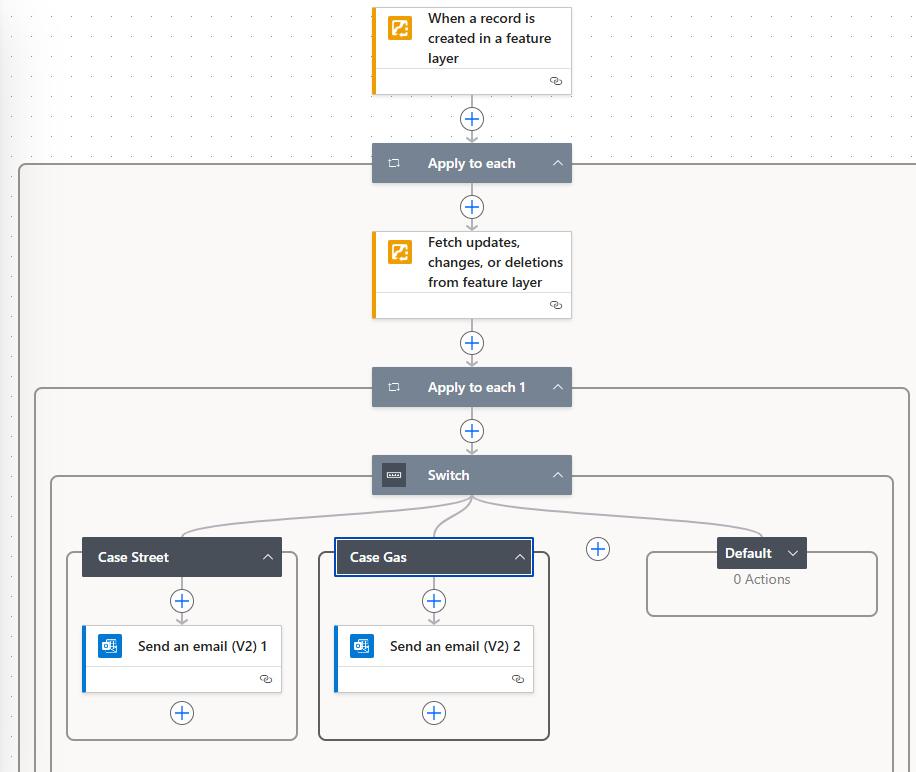
How can I define the emails based on an attribute of a field?
The second issue I'm running into is, I add the feature in the data, and power automate doesn't trigger for like 10-15 minutes. Is this normal on this type of trigger? I'm use to Survey123 where it triggers pretty quickly.
Solved! Go to Solution.
@LindseyStone I have a very similar workflow and I'm using 'Condition' action, as well. Here is what it looks like for me. I have multiple conditions, and one of the conditions is Problem Type (which would be equivalent to your Department field).
@LindseyStone, Try if above works for you. For your question 2, unfortunately that is out of control of ArcGIS Connector. We use Server side webhooks and the flow will start only when the ArcGIS Online FL webhook triggers. We have seen it take longer time to trigger after making the changes. I believe this is under investigation by ArcGIS Online DevOps. "When survey response is submitted" trigger is the only one that is a client-side webhook and triggers almost instantly. You can use this trigger from ArcGIS Connector if that is a better solution and if it works for you.
PS. This should not be a problem for ArcGIS Enterprise Connector.
I want to thank you for the screenshot Nataliya. I had my parallel after the apply to each, so I only had one of those instead of parallel branch each going each to an apply to each and then the condition.
So my status is now I got the flow working sometimes...Sometimes it works, sometimes it doesn't. Sometimes it triggers within a few minutes, sometimes the trigger takes 15 minutes, sometimes it never triggers, sometimes it triggers and says it is successful, but the fetch data doesn't have any field data so, it doesn't actually transfer data down to the condition statements so it technically doesn't complete.
I also did try to test all the conditions when a 15 minute period to see if they were correct, so maybe I overloaded the thing, which is why some of them never processed and they need a little spacing in between.
I did put a ticket into Support to see what other input they have.
I add the feature in the data, and power automate doesn't trigger for like 10-15 minutes
I hate any trigger that relies on "add something somewhere" (E.g., When a record is created). They seem to trigger at random times. Sometimes they are quick. Other times they are insanely slow. I have all my automations on a timer. Every 1-5 minutes (depending on flow), they check for changes in the feature Layer by looking at a helper field (e.g., defaults to FALSE, then I change it to TRUE when processed). Considerably more reliable.
