Summertime is filled with activities we look forward to each year: swimming, BBQs, fireworks, and of course, Esri’s annual User Conference in San Diego, California. Thousands of users attended the conference and had the opportunity to meet ArcGIS Business Analyst product experts and even more watched sessions online. Though many sessions had a Q&A portion, we know that not all of you had the chance to have your questions answered. Recorded sessions are being made available online for everyone in the coming weeks, so we thought it would be helpful to compile some of the most frequently asked questions here in this handy blog post.
What’s the deal with user types?
Since the June 2025 release of ArcGIS Online, ArcGIS Business Analyst is now included as a software option for the Creator user type. For ArcGIS Online users with a Creator or above user type, ArcGIS Business Analyst Web App and ArcGIS Business Analyst Mobile App are automatically included with your license and can be accessed through the app switcher.
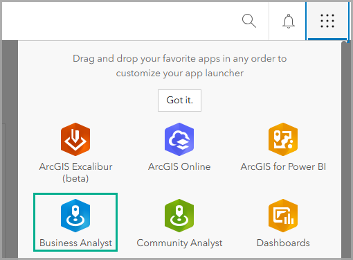
For many at the user conference, the plenary was the first time you may have heard this news! We are excited to welcome the many users who gained access to this powerful application and can’t wait for you to explore the workflows and data included to take your mapping and analysis to the next level.
So, let’s recap: if you are an ArcGIS Online user with a Creator or above user type, you now have access to ArcGIS Business Analyst Web App Standard. ArcGIS Business Analyst has two license levels: Standard and Advanced. The ArcGIS Business Analyst Web App Standard license included with your user type allows you to view maps, apps, information products, and infographics that you can share with other users. ArcGIS Business Analyst Web App Standard is a great way to perform simple analysis and get familiar with the software.
Our team wrote a great FAQ resource to help new users explore ArcGIS Business Analyst Web App Standard: Discover the power of ArcGIS Business Analyst Web App Standard: Now included for Creator and above user types.
What if my organization has some Standard and some Advanced licenses?
Many organizations possess multiple licenses: some Standard and some Advanced. An organization’s administrator can assign, reassign, and unassign Business Analyst Web App licenses using their ArcGIS Online organization’s Licenses page. For details on how to assign Business Analyst licenses to users in your ArcGIS Online organization, or to learn more about collaborating across license levels to share infographics, custom data, analysis results, and more, see the article How to collaborate across license levels in ArcGIS Business Analyst Web App.
What if I have an ArcGIS Pro license? Do I have access to Business Analyst?
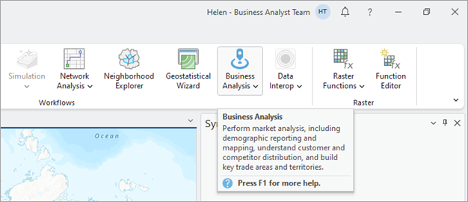
With the purchase of a Business Analyst extension license for ArcGIS Pro, most of the capabilities of ArcGIS Pro’s Business Analyst extension are included with the ArcGIS Pro Basic license level. Once you’ve got the Business Analyst extension license for ArcGIS Pro, you gain access to ArcGIS Pro Basic with Creator or above user type, enabling core functionality in ArcGIS pro.
The full list of capabilities included with ArcGIS Pro Basic, Standard, and Advanced is on the Business Analyst toolbox licensing and Territory Design toolbox licensing pages. Any tool that says “Requires Business Analyst” is available in ArcGIS Pro Basic with a Creator user type, provided that the user has purchased a license for the Business Analyst Pro extension.
A great resource to help you learn more about how to get started with your Creator user type and the Business Analyst extension in ArcGIS Pro is this blog article: Get the most out of your Creator user type in ArcGIS Business Analyst Pro.
Does Business Analyst consume ArcGIS Online credits? How do I know how many credits I’m using?
Another popular question we heard at User Conference was around credit consumption. We know administrators are always concerned about their organization’s credit usage and it's not always clear to everyday users which workflows use credits and how many.
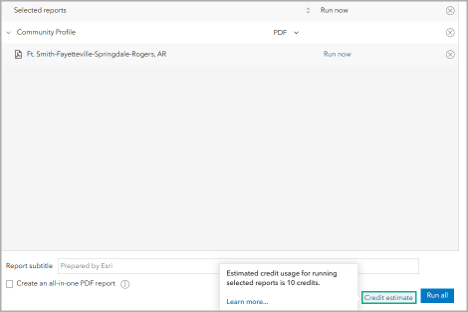
The short answer is yes, many workflows in ArcGIS Business Analyst consume ArcGIS Online credits. The amount of credits used for each workflow differs; for example, creating drive time threshold areas may use only a fraction of a credit while many other workflows like exporting a suitability analysis to PDF or Excel can take 10 or more credits to perform.
For more details on the tools in Business Analyst that consume credits, view the help documentation for a comprehensive table of credit consuming workflows in ArcGIS Business Analyst Web App and Business Analyst tools in ArcGIS Pro. Also be sure to check out the blog article for tips on estimating credit consumption in Business Analyst Web App.
Your feedback and concerns on credit consumption is valuable to us in developing the best solutions to improve your user experience. We are excited to share that the team is working to add credits estimates to the Business Analyst Web App in the near term.
What about data?
Data is an essential part of Business Analyst and so many users were interested in learning more about data: where the data comes from, whether you can work with your own data, how to set up custom data, etc. The good news for everyone is that an ArcGIS Business Analyst Web App license includes access to all the data in Business Analyst. Similarly, an ArcGIS Business Analyst Pro extension license includes access to all Business Analyst data through your online organization.
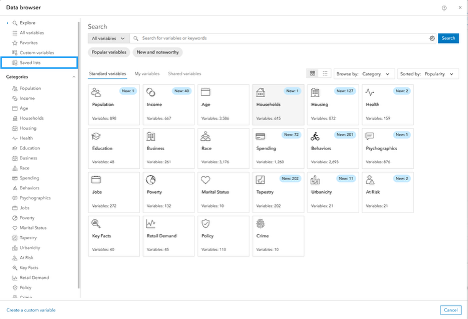
One of the most essential components of ArcGIS Business Analyst Web App is the data browser, a powerful interface that allows you to search for and add demographic variables to your maps, analyses, infographics, and reports. With ArcGIS GeoEnrichment Service, you can add data to the geographic boundaries of your choice, such as counties and census tracts (standard geographies) or wards and drive-time areas (nonstandard geographies). Read about all of the latest improvements added to the Business Analyst data browser in the June 2025 what’s new article.
Can you use the tools in Business Analyst with your own data?
With ArcGIS Business Analyst Web App Advanced and ArcGIS Business Analyst Pro, you can connect to a layer from outside the app and use the attributes it contains or bring in your own file. Though you can use your own data in both Business Analyst Web App Advanced and in Business Analyst Pro, setting up custom data in Web App versus Pro differs in process, functionalities, and technical prerequisites depending on the software used.
Custom data in Business Analyst Web App is great for first-time or newer GIS users performing simple, quick analyses. It’s cloud-based and enables sharing and collaboration across an organization. The variables you set up can be used alongside Esri data and are stored in the data browser on the My variables tab. For more details on using custom data in ArcGIS Business Analyst, visit the help documentation page on setting up custom data in Business Analyst Web App.
If you need more advanced GIS capabilities, local data processing, or complex workflows like Python automation, creating a statistical data collection in Business Analyst Pro is your move. For help setting up custom data in BA Pro, refer to the blog article: An introduction to custom data in ArcGIS Business Analyst Pro. And learn about the power of custom apportionment layers by reading Unlock insights in your own data using statistical data collections in ArcGIS Business Analyst Pro.
Where is the data sourced in ArcGIS Business Analyst?
ArcGIS Business Analyst provides access to Esri Location Data datasets, which consist of a comprehensive set of demographic map layers, web maps, and services for over 170 countries and regions. The data categories available span demographic and socioeconomic information for these regions, such as population, income, households, housing, health, education, jobs, and consumer spending for a variety of products and services.
Esri Demographics data include standard and advanced offerings. Standard demographics are sourced from Michael Bauer Research GmbH and provide consistent data attributions and methodology. Advanced demographics are available for a limited number of countries and regions and sources vary from reliable data partners such as the U.S. Census Bureau.
In addition to the various demographic data updates throughout the year, Esri also periodically launches updated versions of its geodemographic segmentation system ArcGIS Tapestry. At this time, Tapestry only provides U.S. data, grouping U.S. residential areas into distinct segments based on similar socioeconomic and demographic compositions. Source material for the data is supplied by Esri, the U.S. Census Bureau, the U.S. Census Bureau's American Community Survey, and consumer surveys such as MRI-Simmons. Read all about this massive update in the What’s new in Tapestry blog article and explore how to work with ArcGIS Tapestry data in ArcGIS Business Analyst.
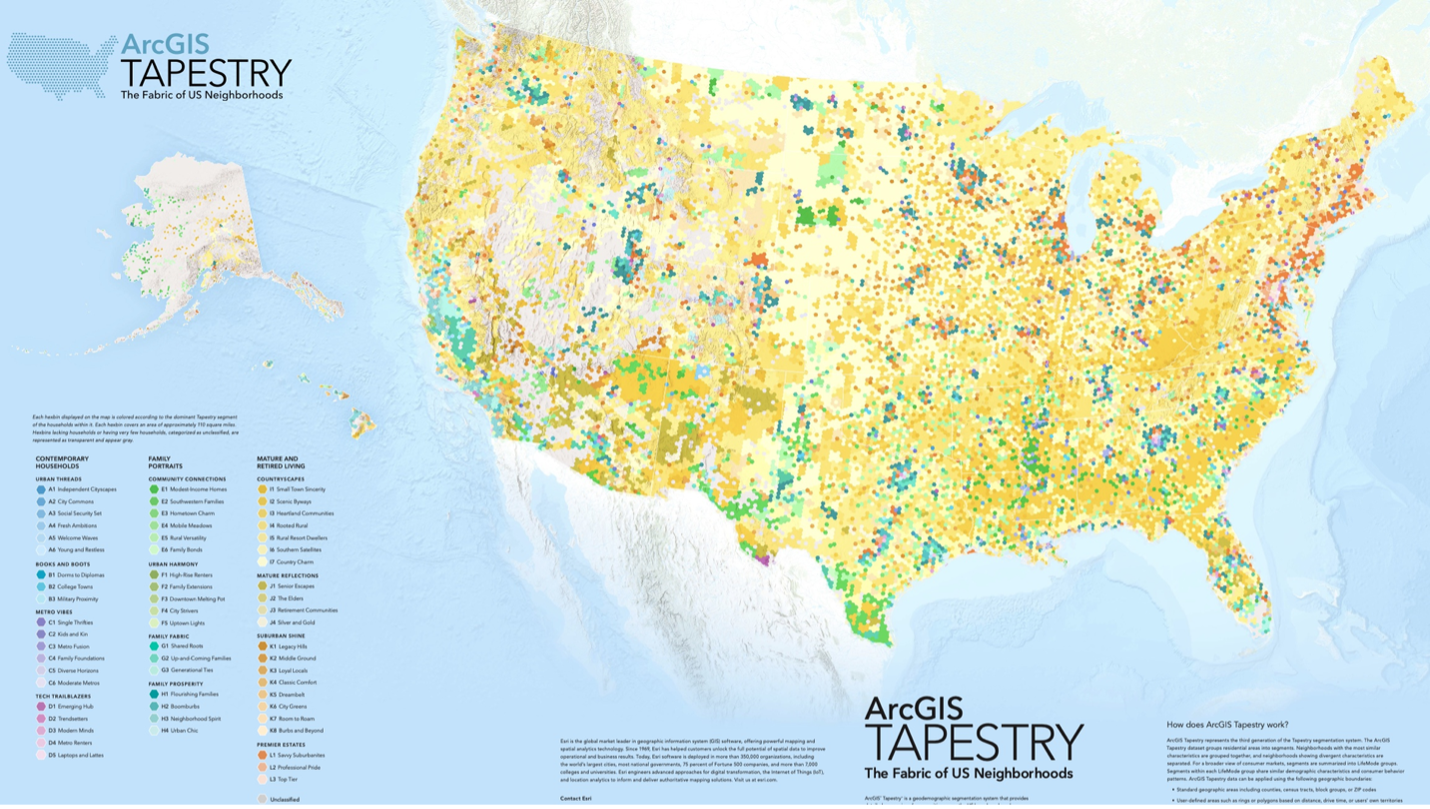
Just because Tapestry data only provides demographic information for the U.S. doesn’t mean there is a shortage of data for other countries. Business Analyst provides data in 177 countries and regions. You can browse and search for data sources in the Data source drop-down menu on the app header. To change the default data source, choose a country in Preferences. Some countries include multiple data sources that offer different variables and geography levels. View the for step-by-step instructions on setting the data source.
For in-depth details on data sources in Esri products including Business Analyst, see the Esri Demographics help documentation and stay up to date on the ArcGIS Blog to see the latest releases of Esri Demographics, like the most recent update in June 2025.
What are Hexagons?
Hexagons are similar to traditional square grids used in GIS, but instead of squares, the grid is made up of six-sided hexagons. Hexagons are an exciting mapping option, great for summarizing points contained in them and quickly seeing differences in point densities independent of standard administrative boundaries.
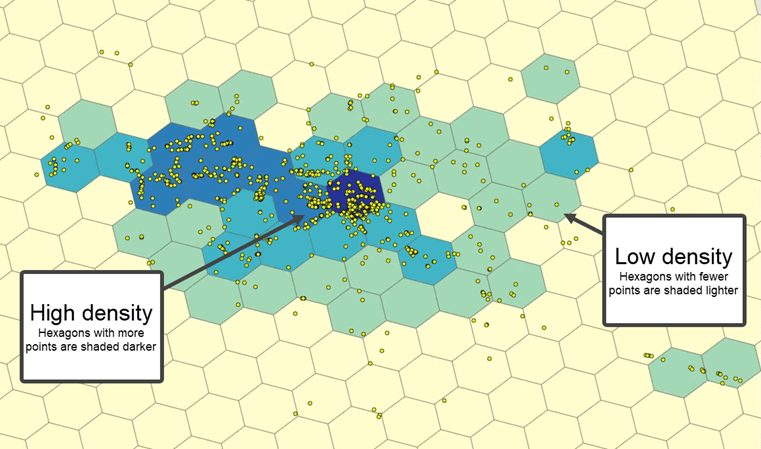
Hexagons are available in the Business Analyst Web App in the following workflows: color-coded maps, smart map search, POI search when using point data aggregation, benchmark comparisons, and suitability analysis. In Business Analyst Pro, hexagons are available in workflows such as generate grids and hexagons and color-coded layers.
To learn more about using hexagons, check out:
Wait, there's a Mobile App?
Yes! ArcGIS Business Analyst Web App comes with a mobile version included to take your analysis on the go. ArcGIS Business Analyst Mobile App is useful as a companion to ArcGIS Business Analyst Web App, offering a subset of its capabilities on your mobile device. You can use the mobile app to evaluate sites and perform field work, such as recording information and taking photos.

The resources help documentation page has a great introduction to Business Analyst Mobile App and read the blog article to learn how to Leverage the unique capabilities of BA Mobile App.
Get started using the Mobile App by downloading for free today!

The Business Analyst team looks forward to the User Conference every year as an opportunity to connect with customers. Whether you're new to Business Analyst and attending the foundational technical sessions or a seasoned veteran diving deep into spatial data with demo theater presentations, your questions, suggestions, and success stories matter. We hope this article has been informative and serves as a resource to answer some of your organization's questions or as a handy refresher you can revisit from time to time.
We'll be back in a few short weeks to share the latest updates to all three Business Analyst product offerings in a significant fall release of ArcGIS Business Analyst Pro, ArcGIS Business Analyst Enterprise, and ArcGIS Business Analyst Web and Mobile App.
In the meantime, we encourage you to connect with us here on Esri Community or by joining our LinkedIn Business Analyst User Group and following us on X @ArcGISApps.
For further resources on all things Business Analyst:

