Turn on suggestions
Auto-suggest helps you quickly narrow down your search results by suggesting possible matches as you type.
Cancel
- Home
- :
- All Communities
- :
- Developers
- :
- ArcGIS API Silverlight (Retired)
- :
- ArcGIS API Silverlight Questions
- :
- Re: centre the map with all feature collection
Options
- Subscribe to RSS Feed
- Mark Topic as New
- Mark Topic as Read
- Float this Topic for Current User
- Bookmark
- Printer Friendly Page

06-02-2012
08:47 AM
- Mark as New
- Bookmark
- Subscribe to RSS Feed
- Permalink
Dears,
In my map i am adding lot of graphics in a buttonclick.For Eg: When i click button 5 graphics with different long and lat is adding on map.Some times graphics collection is more than 5 ...Now i need to position my map based on this graphics.Now i can ee the graphics after i drag the map.when i click button i need the display of map with all added graphics and zoom should adjust accordingly.
.
In my map i am adding lot of graphics in a buttonclick.For Eg: When i click button 5 graphics with different long and lat is adding on map.Some times graphics collection is more than 5 ...Now i need to position my map based on this graphics.Now i can ee the graphics after i drag the map.when i click button i need the display of map with all added graphics and zoom should adjust accordingly.
<esri:Map Grid.Row="3" Extent="-120, 20, -100, 40" Name="MyMap" Visibility="Visible" Background="Transparent" Margin="2,0" BorderThickness="1" BorderBrush="{StaticResource TitleBarGradient}"> <esri:ArcGISTiledMapServiceLayer ID="StreetMapLayer" Url="http://server.arcgisonline.com/ArcGIS/rest/services/ESRI_StreetMap_World_2D/MapServer" /> <esri:GraphicsLayer ID="MyGraphicsLayer"> <esri:GraphicsLayer.MapTip> <StackPanel Orientation="Vertical" Margin="10,10,10,10"> <TextBlock Text="{Binding [Name]}" Width="120" Height="20" TextAlignment="Center" FontWeight="SemiBold"/> </StackPanel> </esri:GraphicsLayer.MapTip> </esri:GraphicsLayer> </esri:Map> For recordcount = 0 To e.Result.Count - 1 'Dim geometry1 As New Point(csys, rsOman("lon"), rsOman("lat")) Dim Status As String = "" Dim EventId As Integer Dim colourstyle As String EventId = e.Result(recordcount).EEventID If EventId = 253 Then colourstyle = "GlobePictureSymbol_Blue" ElseIf EventId = 110 Then colourstyle = "GlobePictureSymbol_Green" ElseIf EventId = 108 Then colourstyle = "GlobePictureSymbol_Green" ElseIf EventId = 101 Then colourstyle = "GlobePictureSymbol_Red" ElseIf EventId = 142 Then colourstyle = "GlobePictureSymbol_Black" ElseIf EventId = 254 Then colourstyle = "GlobePictureSymbol_Gray" Else colourstyle = "GlobePictureSymbol_Black" End If Status = e.Result(recordcount).EEventName '************************* ''''''''''LOCATION FROM POI and Roaddata same connection not possible bfre close Dim procname As String = "" Dim location As String location = "" If e.Result(recordcount).EStreetAddress <> "NULL" And e.Result(recordcount).EStreetAddress <> "" Then location = e.Result(recordcount).ELocationName & ", STREET: " & e.Result(recordcount).EStreetAddress Else location = e.Result(recordcount).ELocationName & "" End If '''''''''''''''''''''''''' TxtLastUpd.Text = e.Result(recordcount).Edatedisplay Dim gpsNMEASentences As String = "$GPGGA,92204.9, " & e.Result(recordcount).ELat & ", N," & e.Result(recordcount).ELon & ", W, 1, 04, 2.4, 25.7, M,,,,*75" Dim gpsNMEASentenceArray() As String = gpsNMEASentences.Split(ControlChars.Lf) Dim gpsNMEASentence() As String = gpsNMEASentenceArray(0).Split(","c) Dim graphic As New Graphic() With { .Geometry = mercator.FromGeographic(New MapPoint(Convert.ToDouble(gpsNMEASentence(4)), Convert.ToDouble(gpsNMEASentence(2)))), .Symbol = TryCast(LayoutRoot.Resources(colourstyle), Symbol) } Dim graphicsLayer As GraphicsLayer = TryCast(MyMap.Layers("MyGraphicsLayer"), GraphicsLayer) graphicsLayer.Graphics.Clear() graphicsLayer.Graphics.Add(graphic) esriLogoImage.Visibility = Windows.Visibility.Collapsed MyMap.Visibility = Windows.Visibility.Visible MyMap.ZoomTo(graphicsLayer.FullExtent) NextSolved! Go to Solution.
1 Solution
Accepted Solutions


06-09-2012
09:08 AM
- Mark as New
- Bookmark
- Subscribe to RSS Feed
- Permalink
What u said is correct..Almost all locations are very closer....How can i expand to reach a minimal size???
Map has a MinimumResolution property that defines the lowest resolution that can be zoomed to
-Joe
Thanks,
-Joe
-Joe
9 Replies


06-04-2012
12:40 AM
- Mark as New
- Bookmark
- Subscribe to RSS Feed
- Permalink
.Geometry = mercator.FromGeographic(New MapPoint(Convert.ToDouble(gpsNMEASentence(4)), Convert.ToDouble(gpsNMEASentence(2)))),
You map seems to be in Geographical coodinates (as http://server.arcgisonline.com/ArcGIS/rest/services/ESRI_StreetMap_World_2D/MapServer).
So you should not convert the graphic coordinates to web mercator.
Due to that, a conversion back to geographical coordinates is done asynchronously and then your ZoomTo code : MyMap.ZoomTo(graphicsLayer.FullExtent) is not working synchronously.
06-06-2012
07:53 AM
- Mark as New
- Bookmark
- Subscribe to RSS Feed
- Permalink
Dear friend,
I tried the way what u mentioned.I am getting FullExtent is nothing.Map is not showing properly also.I pasted my code below.Can u tell me where i am wrong.If i will not add MyMap.ZoomTo(graphicsLayer.FullExtent) then i can see map then i need to drag for viewing the graphics.
ButtonClick code
I tried the way what u mentioned.I am getting FullExtent is nothing.Map is not showing properly also.I pasted my code below.Can u tell me where i am wrong.If i will not add MyMap.ZoomTo(graphicsLayer.FullExtent) then i can see map then i need to drag for viewing the graphics.
        <esri:Map Extent="-120, 20, -100, 40"  Grid.Row="3" Name="MyMap"  Visibility="Visible" Background="Transparent" Margin="2,0" BorderThickness="1" BorderBrush="{StaticResource TitleBarGradient}">
          <esri:ArcGISTiledMapServiceLayer ID="StreetMapLayer" Url="http://server.arcgisonline.com/ArcGIS/rest/services/ESRI_StreetMap_World_2D/MapServer" />
          <esri:GraphicsLayer ID="MyGraphicsLayer" />
        </esri:Map>
ButtonClick code
 Dim gpsNMEASentences As String = "$GPGGA, 92204.9, " & e.Result(Loopcnt).ETLat & ", N," & e.Result(Loopcnt).ETLon & ", W, 1, 04, 2.4, 25.7, M,,,,*75"
            Dim gpsNMEASentenceArray() As String = gpsNMEASentences.Split(ControlChars.Lf)
            Dim gpsNMEASentence() As String = gpsNMEASentenceArray(0).Split(","c)
            ''.Geometry = mercator.FromGeographic(New MapPoint(Convert.ToDouble(gpsNMEASentence(4)), Convert.ToDouble(gpsNMEASentence(2)))),
            Dim graphic As New Graphic() With
                {
                    .Geometry = New MapPoint(Convert.ToDouble(gpsNMEASentence(4)), Convert.ToDouble(gpsNMEASentence(2))),
                    .Symbol = TryCast(LayoutRoot.Resources(colourstyle), Symbol)
                }
            Dim strhotspot As String = ""
            strhotspot = "VEHICLE: " & Trim(TryCast(CmbFahrname.SelectedItem, comboloadclass).ename.ToString()) & ", DATETIME: " & e.Result(Loopcnt).ETdatedisplay & ", LOCATION: " & e.Result(Loopcnt).ETLocationName & ", SPEED: " & e.Result(Loopcnt).ETspeed & ", STATUS: " & Status
            graphic.Attributes.Add("STRHOTSPOT", strhotspot)
            AddHandler graphic.MouseLeave, AddressOf Graphic_MouseLeave
            AddHandler graphic.MouseEnter, AddressOf Graphic_MouseEnter

            'Delete the existing find object and add the new one
            If (Not MyMap Is Nothing) Then
                If recordcount = 1 Then
                    If (EventId1 = 12 And EventId2 = 14) Then ''excluding vehicle idle after journey end
                    Else
                        graphicsLayer.Graphics.Add(graphic)
                    End If
                Else
                    If (EventId1 = 12 And EventId2 = 14) Then ''excluding vehicle idle after journey end
                    Else
                        graphicsLayer.Graphics.Add(graphic)
                    End If
                End If
                ''adding lines''''''''''''''''''
                If recordcount > 1 Then
                    Dim startPoint As New MapPoint(Startlong, Startlat)
                    Dim endPoint As New MapPoint(Endlong, Endlat)
                    Dim pointCollection As New ESRI.ArcGIS.Client.Geometry.PointCollection()
                    pointCollection.Add(startPoint)
                    pointCollection.Add(endPoint)
                    Dim polyline As New ESRI.ArcGIS.Client.Geometry.Polyline()
                    polyline.Paths.Add(pointCollection)
                    Dim graphicLine As New Graphic() With
                {
                    .Symbol = TryCast(LayoutRoot.Resources("DefaultLineSymbol"), Symbol),
                    .Geometry = mercator.FromGeographic(polyline)
                }
                    If (EventId1 = 12 And EventId2 = 14) Then
                    Else
                        graphicsLayer.Graphics.Add(graphicLine)
                    End If
                End If

                MyMap.ZoomTo(graphicsLayer.FullExtent)
06-06-2012
11:22 PM
- Mark as New
- Bookmark
- Subscribe to RSS Feed
- Permalink
Try by initializing the Spatial reference of your graphics.
Something like:
Also you have still a web mercator conversion:
Try without it.
Something like:
.Geometry = New MapPoint(Convert.ToDouble(gpsNMEASentence(4)), Convert.ToDouble(gpsNMEASentence(2)), New SpatialReference(4326)),
Also you have still a web mercator conversion:
.Geometry = mercator.FromGeographic(polyline)
Try without it.
06-09-2012
04:36 AM
- Mark as New
- Bookmark
- Subscribe to RSS Feed
- Permalink
.Geometry = New MapPoint(Convert.ToDouble(gpsNMEASentence(4)), Convert.ToDouble(gpsNMEASentence(2)), New SpatialReference(4326)),
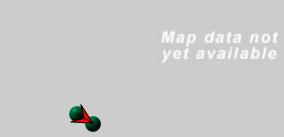
But i am getting mapdata not available screen.See the screenshot attached here with.My coding is like as follows
[ATTACH=CONFIG]15085[/ATTACH]
 Dim gpsNMEASentences As String = "$GPGGA, 92204.9, " & e.Result(Loopcnt).ETLat & ", N," & e.Result(Loopcnt).ETLon & ", W, 1, 04, 2.4, 25.7, M,,,,*75"
            Dim gpsNMEASentenceArray() As String = gpsNMEASentences.Split(ControlChars.Lf)
            Dim gpsNMEASentence() As String = gpsNMEASentenceArray(0).Split(","c)
            ''.Geometry = mercator.FromGeographic(New MapPoint(Convert.ToDouble(gpsNMEASentence(4)), Convert.ToDouble(gpsNMEASentence(2)))),
            Dim graphic As New Graphic() With
                {
                    .Geometry = New MapPoint(Convert.ToDouble(gpsNMEASentence(4)), Convert.ToDouble(gpsNMEASentence(2)), New SpatialReference(4326)),
                    .Symbol = TryCast(LayoutRoot.Resources(colourstyle), Symbol)
                }
            Dim strhotspot As String = ""
            strhotspot = "VEHICLE: " & Trim(TryCast(CmbFahrname.SelectedItem, comboloadclass).ename.ToString()) & ", DATETIME: " & e.Result(Loopcnt).ETdatedisplay & ", LOCATION: " & e.Result(Loopcnt).ETLocationName & ", SPEED: " & e.Result(Loopcnt).ETspeed & ", STATUS: " & Status
            graphic.Attributes.Add("STRHOTSPOT", strhotspot)
            AddHandler graphic.MouseLeave, AddressOf Graphic_MouseLeave
            AddHandler graphic.MouseEnter, AddressOf Graphic_MouseEnter

            'Delete the existing find object and add the new one
            If (Not MyMap Is Nothing) Then
                If recordcount = 1 Then
                    If (EventId1 = 12 And EventId2 = 14) Then ''excluding vehicle idle after journey end
                    Else
                        graphicsLayer.Graphics.Add(graphic)
                    End If
                Else
                    If (EventId1 = 12 And EventId2 = 14) Then ''excluding vehicle idle after journey end
                    Else
                        graphicsLayer.Graphics.Add(graphic)
                    End If
                End If
                ''adding lines''''''''''''''''''
                If recordcount > 1 Then
                    Dim startPoint As New MapPoint(Startlong, Startlat)
                    Dim endPoint As New MapPoint(Endlong, Endlat)
                    Dim pointCollection As New ESRI.ArcGIS.Client.Geometry.PointCollection()
                    pointCollection.Add(startPoint)
                    pointCollection.Add(endPoint)
                    Dim polyline As New ESRI.ArcGIS.Client.Geometry.Polyline()
                    polyline.Paths.Add(pointCollection)
                    Dim graphicLine As New Graphic() With
                {
                    .Symbol = TryCast(LayoutRoot.Resources("arrowLineSymbol"), Symbol),
                    .Geometry = polyline
                }
                    If (EventId1 = 12 And EventId2 = 14) Then ''excluding vehicle idle after journey end
                    Else
                        graphicsLayer.Graphics.Add(graphicLine)
                    End If
                End If

                If recordcount = 1 Then

                Else
                    Startlong = e.Result(Loopcnt).ETLon
                    Startlat = e.Result(Loopcnt).ETLat
                End If
                '''''''''''''''''''''''''''''''
                esriLogoImage.Visibility = Windows.Visibility.Collapsed
                MyMap.Visibility = Windows.Visibility.Visible

            End If

            txtEndLong.Text = e.Result(Loopcnt).ETLon
            TxtEndLat.Text = e.Result(Loopcnt).ETLat
            recordcount = recordcount + 1
        Next

        If datastat = False Then
            MessageBox.Show("NO DATA,Pls Try Again....")
        Else
            MyMap.ZoomTo(graphicsLayer.FullExtent)
        End If
06-09-2012
04:43 AM
- Mark as New
- Bookmark
- Subscribe to RSS Feed
- Permalink
But i am getting mapdata not available screen
I guess it's working well if you zoom out. Isn't it?
Are your graphics at the right location? (else there is a Spatial Reference mismatch somewhere).
06-09-2012
05:01 AM
- Mark as New
- Bookmark
- Subscribe to RSS Feed
- Permalink
I guess it's working well if you zoom out. Isn't it?
Are your graphics at the right location? (else there is a Spatial Reference mismatch somewhere).
Yes if i zoom out i can see the points on map...The clients needs to click button then need to zoom out then only they can see the map...How can i avoid this situation???
06-09-2012
07:02 AM
- Mark as New
- Bookmark
- Subscribe to RSS Feed
- Permalink
Yes if i zoom out i can see the points on map...The clients needs to click button then need to zoom out then only they can see the map...How can i avoid this situation???
I guess it's because your graphcis are too close and so your full extent is too small. You can expand it to reach a minimal size.
06-09-2012
08:50 AM
- Mark as New
- Bookmark
- Subscribe to RSS Feed
- Permalink
I guess it's because your graphcis are too close and so your full extent is too small. You can expand it to reach a minimal size.
What u said is correct..Almost all locations are very closer....How can i expand to reach a minimal size???
06-09-2012
09:08 AM
- Mark as New
- Bookmark
- Subscribe to RSS Feed
- Permalink
What u said is correct..Almost all locations are very closer....How can i expand to reach a minimal size???
Map has a MinimumResolution property that defines the lowest resolution that can be zoomed to
-Joe
Thanks,
-Joe
-Joe
